AI Trends
What is Generative UI (GenUI)? The End of Static Dashboards and Fixed Interfaces
10 min read
Generative UI lets an AI model assemble the interface in real time around the user, the data, and the task, instead of shipping one fixed layout for everyone. This guide explains what GenUI actually is, how the pipeline works, where it already delivers value, its real risks, and how UK businesses should prepare.
✦Key Takeaways
- Generative UI (GenUI) is a pattern where an AI model decides what interface to render at runtime, returning live components like charts, forms and tables rather than a fixed screen designed months earlier.
- The defining contrast is with a chatbot: a chatbot answers a sales question with a wall of text, while a GenUI system answers it with a chart, a filter and an export button.
- Good GenUI does not let the model draw pixels from scratch. It composes from a stocked library of pre-built, branded, accessible components, which is what keeps it on-brand and safe.
- Static dashboards break because they serve an average user who does not exist, grow by accretion, and push the work of finding answers onto the human.
- The strongest early use cases are analytics, customer support, internal tools and onboarding, where the range of possible questions is large.
- GenUI is not free: it adds latency, per-request cost, and a real risk of inconsistency that can erode the spatial memory users rely on.
- A clean, well-documented design system is now an AI asset, because the quality of your component library directly determines how well a model-driven interface behaves.
For thirty years, software interfaces have been built the same way. A designer draws every screen, a developer codes every button, and the user adapts to whatever the team decided months earlier. The interface is fixed. You get the same dashboard whether you are a power user who lives in the product all day or a first-timer who opened it by accident. Generative UI breaks that contract.
Generative UI, usually shortened to GenUI, is an emerging approach where an AI model assembles the interface in real time, in response to the user, the data, and the task at hand. Instead of shipping one rigid layout for everyone, the software generates the right view for this person, this moment, this question. The dashboard stops being a thing you build once and freeze. It becomes something the system produces on demand.
This is not a cosmetic upgrade. It is a structural shift in how digital products are designed, and it has direct consequences for any UK business that relies on dashboards, admin panels, reporting tools, or customer-facing apps. This guide explains what Generative UI actually is, how it works under the hood, where it already delivers value, and where the hype runs ahead of reality.
What is Generative UI (GenUI)?
Generative UI is a design pattern in which an AI model decides what interface to render, rather than a developer hard-coding it in advance. The model takes context, including a user query, the underlying data, and the user's role and history, and returns not just text but actual interface components: charts, forms, tables, buttons, cards, and controls.
The clearest way to understand it is by contrast with a chatbot. A normal chatbot answers your question with a wall of text. You ask about last quarter's sales and it types out paragraphs of numbers. A Generative UI system answers the same question with a bar chart, a filter control, and a button to export the data. The response is an interface, not a sentence. That single difference is what makes GenUI suited to the data-heavy, operational work where text alone falls short.
The term gained real traction in 2024, when Vercel shipped tooling in its AI SDK that lets models stream interface components as part of their response. You can see the pattern documented in the Vercel AI SDK generative user interfaces guide. Since then the idea has spread well beyond any one framework, with API products like Thesys building entire businesses around it. The core promise is consistent everywhere: the interface adapts to the user, instead of forcing the user to adapt to the interface.
Why Static Dashboards Are Breaking Down
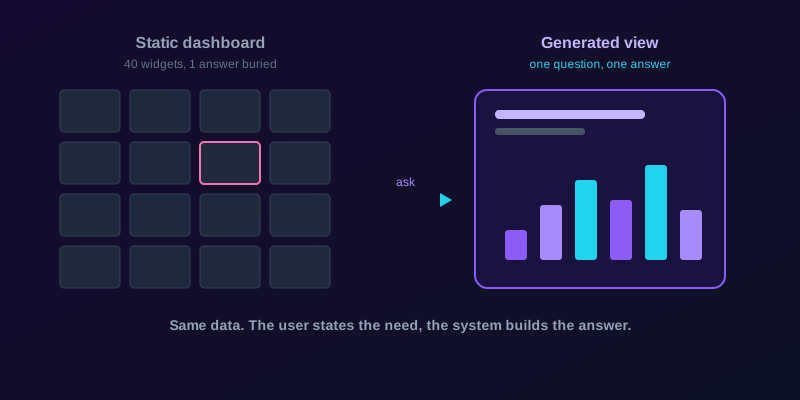
The traditional dashboard was a reasonable compromise for its era. A team could not build a custom view for every user, so they built one dense screen with every chart anyone might need, then bolted on filters. The result is the dashboard most of us know and quietly resent: forty widgets, thirty of which you ignore, and the one number you actually want buried three clicks deep.
Static interfaces fail for a handful of structural reasons, and naming them makes the case for GenUI clearer.
- They serve the average user, who does not exist. Every real person needs a slightly different slice of the data.
- They grow by accretion. Every stakeholder request adds another widget, and nobody ever removes one, so complexity only ever climbs.
- They push the work onto the human. You learn the tool's logic, its menus, its filter syntax, rather than the tool learning yours.
- They go stale. The questions a business asks change faster than the dashboard gets rebuilt.
GenUI flips the burden. Instead of the user navigating a fixed structure to extract an answer, the user states the need and the system constructs the answer. For data-heavy products, this is the difference between a library you have to search and a librarian who simply hands you the right book.
How Generative UI Actually Works
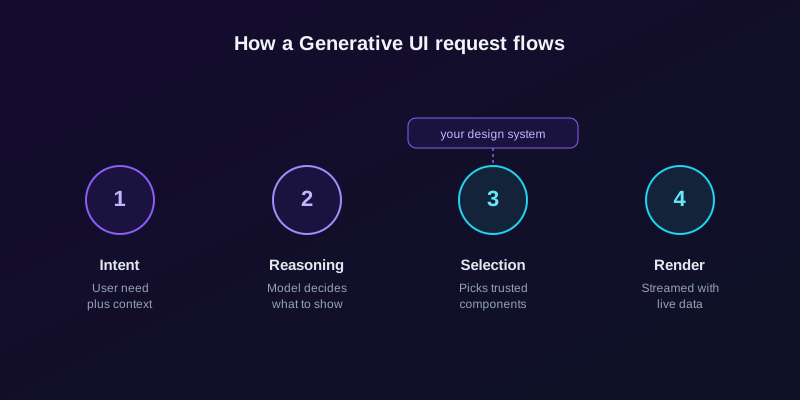
It helps to demystify the pipeline, because GenUI is not magic and the mechanics matter for anyone evaluating it. A typical Generative UI flow runs through four stages.
- Intent. The user expresses a need by typing a question, clicking something, or simply opening a view. The system also gathers implicit context: who they are, what they did last, and which data they are allowed to see.
- Reasoning. A large language model interprets the intent and decides what the user actually needs to see. This is the step that did not exist in traditional software. The model is doing the job a designer used to do, except at runtime.
- Component selection. Rather than inventing pixels, the model chooses from a library of pre-built, branded, tested interface components: your chart, your table, your form, your card. It decides which to use, how to arrange them, and how to populate them.
- Rendering. The chosen components are streamed to the screen and hydrated with real data, often appearing piece by piece as the model decides.
The critical detail, and the one most coverage gets wrong, is the third step. Good Generative UI does not ask an AI to draw a button from scratch. That would be slow, inconsistent, and a brand nightmare. Instead the AI works like a chef with a fully stocked kitchen: the ingredients, meaning your design system components, are fixed and high quality, and the model's job is to compose them into the right dish for the order. This is what keeps GenUI on-brand, accessible, and safe, rather than a random mess of hallucinated layouts.
Your design system is now an AI asset
This is the part most teams underestimate. The better and more consistent your component library, the better your model-driven interface behaves. A messy, half-documented set of components produces messy generated screens. A clean, well-named, accessible design system gives the model good raw material and tight guardrails. The design system stops being a developer convenience and becomes the thing that decides whether your GenUI feels considered or chaotic.
Generative UI vs Traditional UI vs Adaptive UI
These terms get blurred in marketing decks, so it is worth drawing clean lines. The difference comes down to who decides the layout, and when that decision is made.
| Approach | Who decides the layout | When it is decided | Personalisation |
|---|---|---|---|
| Traditional UI | A designer and developer | At build time, months ahead | None: one layout for all |
| Adaptive UI | Pre-written rules and breakpoints | At build time, triggered at runtime | Limited: device, role, A/B variants |
| Generative UI | An AI model | At runtime, per request | Open-ended: tailored to the live context |
Adaptive UI is the closest cousin, and the two get confused most often. The difference is that adaptive interfaces still rely on rules a human wrote in advance: if the screen is narrow, stack the columns; if the user is an admin, show this extra panel. Generative UI has no such fixed rulebook. The model reasons about each situation as it arrives and assembles a response that nobody scripted ahead of time.
Where Generative UI Already Delivers Value
GenUI is not a far-future research idea. It is shipping in specific, high-value places right now, and the pattern is the same in each: the range of possible questions is too large for one static screen to serve well.
- Analytics and BI. Instead of a static dashboard, users ask questions in plain English and receive the right chart, table, or summary assembled on the fly. This is the flagship use case, and the one breaking the dashboard model first.
- Customer support. A support agent, human or AI, sees an interface generated around the specific ticket: this customer's order, the relevant refund control, the exact policy, and nothing else.
- Internal tools and admin panels. The category notorious for ugly, bloated screens. GenUI can render a focused view per task instead of one mega-form serving forty different workflows.
- Onboarding and e-commerce. A new user and a returning power user see genuinely different interfaces, each tuned to what they are ready for.
- Healthcare and operations. A clinician reviewing a patient sees a layout built around that patient's data and the current decision, not a generic record template.
The e-commerce case connects directly to a broader shift we covered in the agentic shopping revolution, where the interface itself starts behaving like an assistant rather than a catalogue.
The Risks and Limits of GenUI
GenUI deserves scrutiny, not evangelism. The honest picture includes real constraints, and ignoring them is how teams ship something worse than the dashboard they replaced.
- Consistency and trust. If the interface changes every time, users can lose the spatial memory that makes software feel learnable. The Nielsen Norman Group has cautioned that interfaces which shift unpredictably can erode usability rather than improve it. The fix is constraint: generate within tight rails, never freely.
- Latency and cost. Asking a model to assemble an interface adds milliseconds to seconds, plus a per-request cost that a static page simply does not carry. On high-traffic screens this adds up fast.
- Hallucination at the UI layer. A model that picks the wrong component, or fills the right one with the wrong data, is worse than a boring static screen, because it looks authoritative while being wrong.
- Accessibility and testing. A screen generated fresh each time is harder to test, audit, and guarantee accessible. It is solvable, but only with the component-library discipline described earlier.
- It is not always the right tool. A login form does not need to be generated. Fixed, predictable interfaces are correct for fixed, predictable tasks.
This is also why human-in-the-loop thinking applies to interfaces, not just to AI decisions. The model proposes a layout; sensible systems still constrain, review, and bound what it is allowed to produce.
How UK Businesses Should Prepare
You do not need to rebuild your product around GenUI tomorrow. You do need to position for it, because the businesses that prepare early will own the transition rather than scramble through it.
- Invest in your design system. A clean, consistent, well-documented component library is the single biggest enabler of Generative UI, and it is good engineering regardless.
- Start where questions are open-ended. Analytics, reporting, search, and internal tools are the highest-value entry points. Login screens and checkout are not.
- Keep humans in the loop and keep rails tight. Constrain what the model can generate. Treat the AI as a composer of trusted parts, never an inventor of new ones.
- Measure against the static baseline. Does the generated view actually reduce clicks, time to answer, and support load? If not, you have added cost for nothing.
This is exactly the kind of architectural decision an AI native agency is built to make, because it sits at the intersection of design systems, model behaviour, and real product outcomes.
Conclusion
Generative UI is the logical endpoint of two trends colliding: interfaces are software, and software can now be written at runtime by models. The fixed dashboard, drawn once and frozen, is starting to look like the printed map in an age of turn-by-turn navigation. It still works, but it makes the user do the orientation.
The shift will not be uniform or instant. Forms, checkouts, and simple flows will stay static, and rightly so. But for the data-rich, question-heavy surfaces where most enterprise value sits, the interface that builds itself around the user is going to win. The businesses that prepare now, by investing in their component systems and experimenting at the edges, will be the ones who set the pace. If you are weighing where Generative UI fits in your product, that is exactly the kind of question worth pressure-testing before you build.
Frequently Asked Questions
- What is Generative UI (GenUI) in simple terms?
- Generative UI is a design pattern where an AI model builds the interface in real time, instead of a developer hard-coding every screen in advance. The model reads the user's intent and the data, then returns actual interface components such as charts, tables and forms, arranged for that specific person and task. In short, the software generates the right view on demand rather than showing everyone the same fixed layout.
- How is Generative UI different from a chatbot?
- A chatbot replies with text. Ask it about last quarter's revenue and it types out paragraphs of numbers. A Generative UI system answers the same question with a bar chart, a filter control and an export button. The output is a usable interface, not a sentence, which makes it far better suited to data-heavy and operational tasks.
- Does the AI design the interface from scratch?
- No, and this is the most important detail. Well-built GenUI does not ask a model to invent pixels or draw new buttons. It gives the model a fixed library of pre-built, branded, tested components and lets it choose and arrange them, like a chef composing a dish from a stocked kitchen. That is what keeps the result on-brand, accessible and predictable.
- Is Generative UI ready for production use in 2026?
- Yes, in specific places. It is already shipping in analytics, AI support tools, and internal admin panels, often built on frameworks like the Vercel AI SDK. It is not the right choice for everything: fixed flows such as login and checkout should stay static. GenUI earns its keep where the space of possible questions is large and a single static screen cannot serve everyone well.
- What are the main risks of Generative UI?
- The big four are consistency, latency, cost and trust. An interface that changes every time can erode the muscle memory that makes software feel learnable, model-driven assembly adds time and per-request cost, and a model that picks the wrong component or wrong data looks authoritative while being incorrect. The mitigation is to generate within tight rails and keep humans in the loop.
- How should a UK business prepare for Generative UI?
- Start by investing in a clean, consistent design system, because that component library is the single biggest enabler of GenUI. Pilot it where questions are open-ended, such as reporting and internal tools, not on login screens. Keep the model constrained to trusted components, and measure every generated view against the static baseline on clicks, time to answer and support load.
- Will Generative UI replace UX designers?
- No. It moves their work earlier and makes it more valuable. Instead of drawing every screen, designers define the component system, the rules, and the guardrails the model composes within. The design system becomes the product, and the quality of that system decides whether the generated interface feels considered or chaotic.