Strategy
The Era of Invisible AI: Why the Best Business Automation Is the Kind You Never See
12 min read
Chatbots made AI visible, and that is exactly the problem: another tab, another login, another skill your team must learn. The real operational ROI sits in invisible AI: background automation triggered by events, working silently inside the accounting, CRM and inbox tools your business already owns. Here is the case, the ROI mechanics, and five automations to switch on this quarter.
✦Key Takeaways
- Chat is an interface, not the technology. Most chat-first tools fail on adoption because they ask busy people to learn prompting on top of their day job.
- Invisible AI is triggered by events (an email arrives, an invoice ages, a lead lands), not by prompts, and it delivers finished work inside tools your team already opens.
- Software ROI is usage multiplied by value per use. Background automation wins because usage is total by design: nobody has to remember it exists.
- Your business already trusts invisible AI: spam filtering, card fraud screening and bank reconciliation suggestions. Extending that pattern beats adopting another destination app.
- Invisible does not mean unsupervised. Uncertain cases route to a human exceptions queue, every action is logged, and consequential steps wait for sign-off.
- Adopt one automation at a time, each with a baseline metric measured before launch. Boring and measurable is what software ROI for SMEs actually looks like.
You have probably sat through the demo. A chat window slides open, a friendly cursor blinks, and a salesperson says the words “just ask it anything”. Three weeks after the rollout, nobody on your team has asked it anything. The licence renews anyway. If that story feels familiar, you are not behind on AI; you have simply met its worst interface first. The era that actually pays is quieter: invisible AI, working in the background of the tools your business already owns.
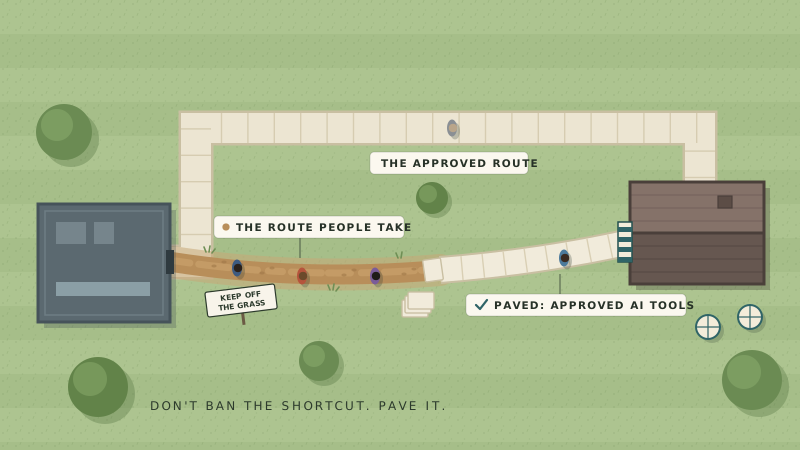
Call the mood what it is: AI fatigue. Owners and operations managers have been pitched a “revolutionary assistant” every quarter since 2023, and each one arrived as one more tab, one more login, one more thing to remember on top of the actual job. When a team quietly drifts back to spreadsheets and inboxes, that is not resistance to progress. It is a rational response to tools that added friction faster than they removed work.
This article makes the case for the alternative. We will look at why chat became the default face of AI and where that model breaks, what invisible AI looks like in a normal small business, the ROI mechanics that favour background automation, five automations you can switch on this quarter, and a simple adoption playbook that does not end in another abandoned subscription.
How Chatbots Became the Face of AI (and Why That Went Wrong)
When ChatGPT arrived, conversation became the world's mental model for artificial intelligence, and software vendors followed the demo. Chat panels appeared bolted onto accounting packages, project tools and CRMs, each branded a copilot. The instinct was understandable: chat demos brilliantly. Ten seconds of typing produces a paragraph of apparent magic, and a room full of prospects nods.
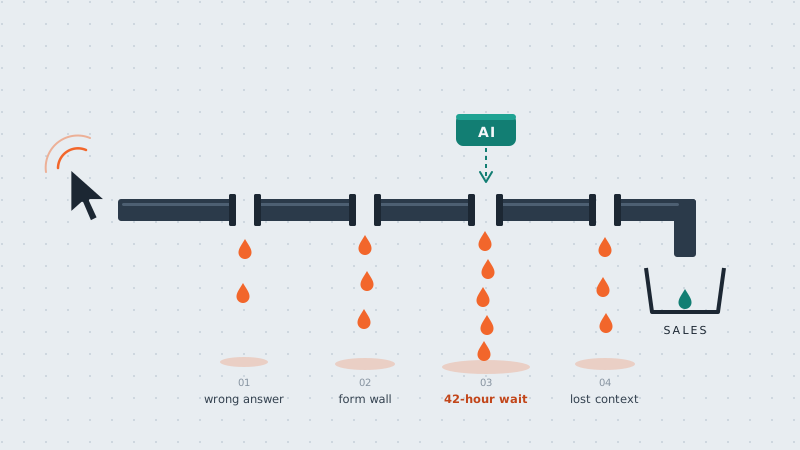
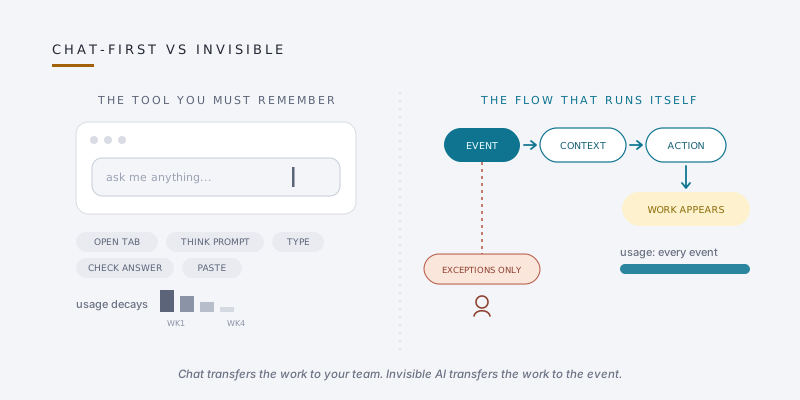
The problem is that a demo is not a workflow. Chat puts a blank box in front of a busy person and transfers the hard work to them: they must know the feature exists, remember to open it, know what to ask, phrase it well, then read and verify whatever comes back before they can use it. Usability researchers at Nielsen Norman Group have documented these limits for years: open-ended conversational interfaces hide what a system can do and make the user do the discovering. Prompting skill is unevenly spread across any team, so results are uneven, trust wobbles, and usage decays week by week while the invoice does not.
There is a legitimate home for conversational AI, particularly in customer-facing support where a well-designed assistant deflects routine questions; we compared the options in our guide to chatbots versus AI agents. The mistake is treating chat as the default shape of AI for internal operations. If your team stopped using the AI tool you bought, the likeliest diagnosis is not “our people are not ready”. It is that the tool asked them to change how they work, and the work won.
What Invisible AI Actually Looks Like
Invisible AI, sometimes called background automation or embedded AI, is intelligence wired into the flow of work rather than parked in a chat window beside it. It is triggered by events instead of prompts. An email lands, an invoice turns thirty days old, a lead form is submitted, a document arrives, and the system acts: classifies, drafts, updates, reconciles, flags. What your team sees is not an interaction but an outcome: the draft already waiting, the record already updated, the anomaly already highlighted, inside the software they were opening anyway.
You already trust this pattern more than you may realise. Your spam filter reads more email than any employee ever will, silently. Your card provider scores every transaction for fraud without asking you to prompt it. Xero suggests bank reconciliation matches from your history; Shopify Magic writes first-draft product descriptions inside the store editor; HubSpot’s Breeze scores and enriches leads inside the CRM; Grammarly tightens sentences as your team types. None of these asked your team to learn anything. That is the point.
Under the surface, every invisible automation follows the same four-step shape: a trigger (the event), context (the surrounding information: the thread, the ledger, the record), an action (draft, update, flag, file), and a log (a record of what was done, for a human to check when it matters). Keep that shape in mind; it is the difference between automation you can govern and magic you have to hope about.
| Dimension | Chat-first AI | Invisible AI |
|---|---|---|
| Where it lives | A new tab or panel | Inside tools you already use |
| Who starts it | A person with a prompt | An event in the business |
| Skill required | Prompting, verifying | None day to day |
| Adoption curve | Decays after week one | Total by default |
| How ROI shows up | Anecdotes | Before and after metrics |
The ROI Mechanics: Why Background Automation Pays
Strip the jargon and software ROI is a short equation: how often it gets used, times the value of each use, minus what it costs in money and attention. Chat-first tools leak value on the first term, because usage depends on habit change, and the attention term, because every tool that must be remembered taxes the team. Background automation leaks on neither. It runs whether or not anyone remembers it, and it asks for attention only when something needs a human.
The returns show up in four places you can actually measure. Hours returned: drafting, data keying and triage that stop consuming afternoons. Cycle time: leads answered in minutes rather than days, quotes out the same morning. Leakage caught: invoices that never got chased, billable work that never got invoiced, renewals that slipped. Error rates: fewer copy-paste mistakes between systems. Each one can be baselined for a week before you switch anything on, which is what makes the ROI conversation honest rather than hopeful.
The cost side is friendlier than most owners expect, because the first wave of invisible AI is already inside subscriptions you pay for: your accounting package, your CRM, your design tool, your email platform. Switching those features on costs configuration time, not licences. Where you do build, a thin automation layer connecting existing systems is a different financial animal from adopting a new platform; the place budgets die is rebuying software, and the trap of cheap pilots that balloon in production, which we unpacked in the AI ROI trap. A useful discipline for any purchase: the no-new-logins rule. If a proposed AI tool requires your team to open one more destination every day, make it argue hard for the exception.
Five Invisible Automations an SME Can Switch On This Quarter
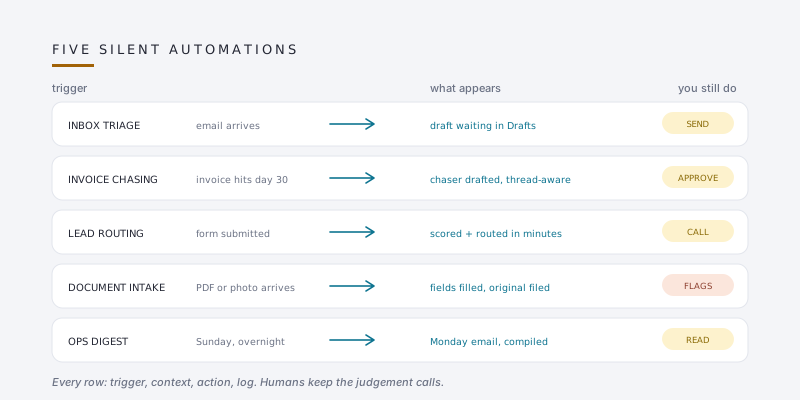
None of these require a data science team. All of them follow the trigger, context, action, log shape, and each leaves a human exactly where judgement matters.
- Inbox triage and drafted replies. Incoming email is labelled, prioritised and, for the routine half, answered with a draft sitting in your drafts folder. Your team reads, edits and sends. The invisible part read six months of history to match your tone; the visible part is simply that replies are ready.
- Context-aware invoice chasing. The system watches the ledger, notices the invoice at thirty days, checks the thread for disputes or promises, and drafts the chaser accordingly. Finance approves and sends. This works with the stack you already run, as we showed in our guide to AI agents on Shopify, Xero, Sage and HubSpot.
- Lead enrichment and routing. A form submission is enriched with company details, scored against your best-customer profile, and routed to the right person with a suggested first reply, while the lead is still warm.
- Document intake. Receipts, purchase orders and supplier quotes arrive as PDFs and photographs; the system reads them into the right fields of the right records and files the originals, flagging anything it is unsure about.
- The Monday ops digest. One email, assembled overnight: last week’s numbers, this week’s risks, the three anomalies worth a look. Nobody compiles it, everybody reads it. If you want to build this yourself, our walkthrough of zero-code AI pipelines is the gentlest on-ramp.
A fair question at this point: which one first? Pick the one attached to money you are visibly losing. Unchased invoices and slow lead response are usually the shortest path from switch-on to a number your accountant can see.
Adopting Invisible AI Without Another Abandoned Tool
The playbook is deliberately boring, which is a feature. Boring is what dependable returns look like.
- Start from a process, not a product. Name one task someone repeats for thirty minutes or more a day. That task, not a vendor’s feature list, defines what you need.
- Switch on what you already pay for. Audit the AI features inside your current accounting, CRM, email and design subscriptions before buying anything new. Most SMEs are under-using tools they already own.
- Build the exceptions inbox before launch. Invisible does not mean unsupervised. Decide where uncertain cases go, name the person who reviews them, and keep a log of every automated action so questions have answers.
- One metric per automation. Baseline it for a week before launch: hours on the task, days to payment, minutes to first reply. Compare after a month. Keep or kill on the number.
- Sequence, do not sprint. One automation per month, proven and owned, beats five launched in a fortnight and quietly abandoned by autumn.
The emotional promise matters as much as the financial one. Done properly, invisible AI gives your team fewer things to think about, not more. That is the opposite of the last three tools they were sold, and they will notice the difference.
Conclusion: The Best AI Is the AI You Forget Is There
The chat window made AI legible to the world, but legibility is not leverage. For a small business, the leverage is in the background: the reply already drafted, the invoice already chased, the lead already routed, the anomaly already flagged, all inside software your team opened anyway. Becoming an “AI business” does not mean your people talk to machines all day. It means the machinery beneath their tools quietly does more, so their day contains more judgement and less keying.
If you want a second pair of eyes, AI Native Agency runs invisible AI audits for UK small businesses: we map your existing stack, switch on what you already pay for, and build only the thin connecting layer you actually need. The best outcome we can deliver is that six months from now, you rarely think about AI at all.
Frequently Asked Questions
- What is invisible AI?
- Invisible AI is artificial intelligence embedded inside existing business tools and triggered by events rather than prompts. It classifies, drafts, updates and flags in the background, so staff see outcomes, a draft ready or a record updated, instead of interacting with a chat window. It is also called background automation or embedded AI.
- Is a chatbot ever the right choice for a small business?
- Yes, in the right seat. A well-designed assistant on your website can deflect routine customer questions around the clock, and conversational search suits exploratory research. The mistake is making chat the default interface for internal operations, where event-driven automation removes more friction than conversation adds.
- What is AI fatigue and how do I avoid it in my team?
- AI fatigue is the scepticism that builds after repeated tool rollouts that added logins and learning curves without removing work. You avoid it by choosing automations that arrive inside tools staff already use, launching one at a time, and letting measured results, not announcements, make the case.
- Do I need new software for background automation?
- Usually less than you think. The first wave is switching on AI features already included in your accounting, CRM, email and design subscriptions. After that, a thin automation layer connecting existing systems typically beats adopting a new platform, and it avoids the migration pain that kills momentum.
- How do I measure the ROI of background automation?
- Pick one metric per automation and baseline it for a week before launch: hours spent on the task, average days to payment, minutes to first lead response, error rates. Compare after a month of running. Because background automation runs on every relevant event, the before and after comparison is clean.
- What happens when invisible AI makes a mistake?
- Well-built systems assume mistakes will happen. Uncertain cases route to a named human's exceptions queue rather than proceeding, every automated action is logged so it can be traced and reversed, and consequential steps, such as sending money or making commitments, wait for human sign-off.
- How much does invisible AI cost a small business?
- Often the marginal cost is near zero to start, because the features sit inside subscriptions you already pay for. A bespoke thin layer, such as document intake or context-aware chasing, is typically a small project measured in days of work, not an enterprise licence measured in seats.
- Does my team need AI training to use background automation?
- Very little, and that is the point. Work arrives in familiar tools in familiar formats: drafts in the drafts folder, updated records in the CRM. The training that matters is for the one or two people who own the exceptions queue and review the logs.