Strategy
From Spreadsheet to Software: How SMEs Can Build Custom Internal Tools with Zero-Code AI Pipelines
9 min read
Every growing SME has a spreadsheet that quietly runs the business, and quietly holds it back. This guide shows non-technical founders how a zero-code AI pipeline turns that spreadsheet into a custom internal tool: describe the workflow in plain English, get a working web app in days, and skip the £25,000 agency quote.
✦Key Takeaways
- The spreadsheet everyone fears is an unbuilt application: data, logic and workflow trapped in a file format with no roles, no history and no validation.
- Intent-driven prototyping inverts the build process: describe the workflow in plain English and tools like Claude, Lovable, Bolt.new and v0 return a working web app in minutes.
- The deepest saving is not the build cost but the change cost: when a tweak is one more sentence, iteration stops being a billable event.
- A zero-code AI pipeline runs in five stages: describe, generate, iterate, connect the edges, then add guardrails before the team depends on it.
- Zero-code suits internal tools with fewer than about twenty users and survivable failure modes. Customer-facing, payment and regulated workloads still need engineers.
Somewhere in your business there is a spreadsheet everyone fears. It prices the quotes, schedules the engineers or tracks every order. Only one person truly understands it, and when they are on holiday, things quietly stop.
That spreadsheet is not a failure. It is proof that your team built software without noticing: data, logic and workflow packed into one file. The problem is the container. A grid has no roles, no audit trail, no validation and no workflow engine, and it breaks silently as the business grows.
Until recently the escape route was expensive: commission an agency, sign a retainer, wait a quarter. A zero-code AI pipeline offers a third path. You describe the tool in plain English, and modern large language models (LLMs) turn that intent into a working web application in days. Here is how non-technical founders do it, what it costs and where the limits sit.
The Spreadsheet Ceiling Every Growing SME Hits
Spreadsheets may be the most successful programming tool ever shipped, and nearly every SME runs core operations on at least one. The trouble comes after the start. Professor Ray Panko’s research at the University of Hawaii found errors in roughly 88% of audited spreadsheets, and the horror stories catalogued by EuSpRIG, the European Spreadsheet Risks Interest Group, put real money against that number. The most public failure came in October 2020, when nearly 16,000 positive Covid test results went unreported in England because a legacy Excel file format ran out of rows.
Inside an SME the ceiling feels more mundane:
- Only one person can safely edit, so work queues behind them.
- Versions multiply, and FINAL_v7_ACTUAL.xlsx is somehow not final.
- The real workflow lives in email and WhatsApp chases wrapped around the file.
The ceiling is not about size. It arrives when several people must act on the same data in sequence, which needs state, permissions, validation and history: software behaviours a grid cannot provide.
What Changed: LLMs Turn Intent into Working Software
Two years ago, the journey from “we need a job tracker” to working code ran through requirements workshops, wireframes, sprint plans and invoices. Each translation step added cost and lost intent, which is why small internal tools rarely got built: a £25,000 quote for software serving twelve people never clears the bar, as our guide to UK app development costs sets out.
LLMs collapsed that translation chain. Give Claude, Lovable, Bolt.new, v0 or Replit a plain-English description of a tool, and each will produce a running application: interface, database and logic generated together, in minutes.
This is intent-driven prototyping. You specify what the tool must do, in the language of your business, and the model decides how. Your role becomes editorial: reviewing and redlining a working draft the way a manager reviews a report, not the way a client reviews a £60,000 statement of work.
What a Zero-Code AI Pipeline Actually Looks Like
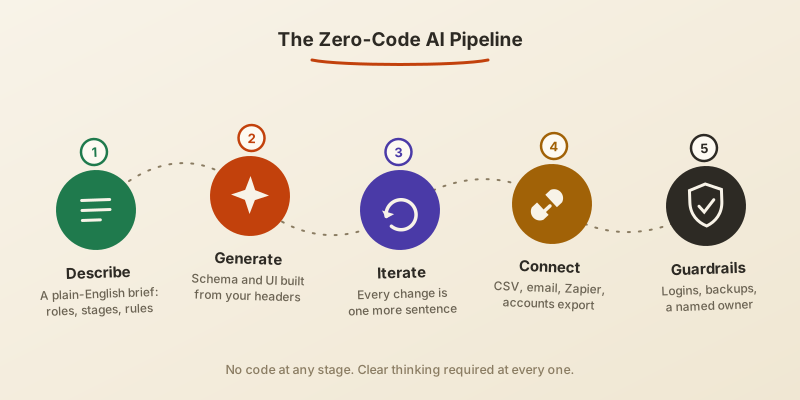
Five stages take you from grid to app. None requires code, but each rewards clear thinking.
1. Describe the Workflow, Not the Technology
Write the brief as if onboarding a new employee: what comes in, who touches it, what rules apply, what must never happen. Paste in your column headers and two anonymised example rows: “Each job has a customer, a site address and a status that moves from quote to booked to in progress to invoiced to paid. Only managers change prices. Engineers see today’s jobs only.”
2. Generate the First Version
The model turns that brief into a data structure and an interface, and most tools accept your existing spreadsheet as a CSV import. Judge the draft on one question only: did it understand the shape of my business? Perfection comes later.
3. Iterate in Conversation
“Engineers need this on a phone.” “Flag any job unpaid after 30 days.” “Add a photo field to each visit.” Each request lands in minutes. This is where retainer economics quietly die: iteration stops being a billable event and becomes a sentence.
4. Connect the Edges
An internal tool earns its keep when it talks to its neighbours: an email when a job is booked, a CSV export your accountant actually wants, a Zapier link into the rest of your stack. Start with CSV in and out. It is unglamorous and it works.
5. Add Guardrails Before You Rely on It
Logins and roles, a nightly backup you have tested restoring, a named owner, and a written rule about what data may live there. If personal data is involved, hosting region and access control deserve five deliberate minutes for UK GDPR’s sake.
A Worked Example: The Job Sheet That Becomes a Job System
Here is a pattern we see repeatedly, condensed into one composite example. A fourteen-person installations firm runs on a 41-column workbook owned by the operations manager. On Monday evening she pastes her brief and column headers into a prototyping tool; by Tuesday she has a tracker with a jobs pipeline, a calendar and a manager-only pricing view. Two days of iteration add a mobile view for engineers, red flags on unpaid invoices and photo uploads per visit. On Friday she imports the live sheet and begins a two-week parallel run with three colleagues, workbook kept as the fallback.
Cash cost: under £100 in subscriptions. Effort: about ten focused hours from someone who has never written code. Note what she did not do: no payments, no customer-facing pages, no accounting migration. The tool stayed inside the boundary where zero-code is strong.
The Economics: Retainer Pricing vs Prompt Pricing
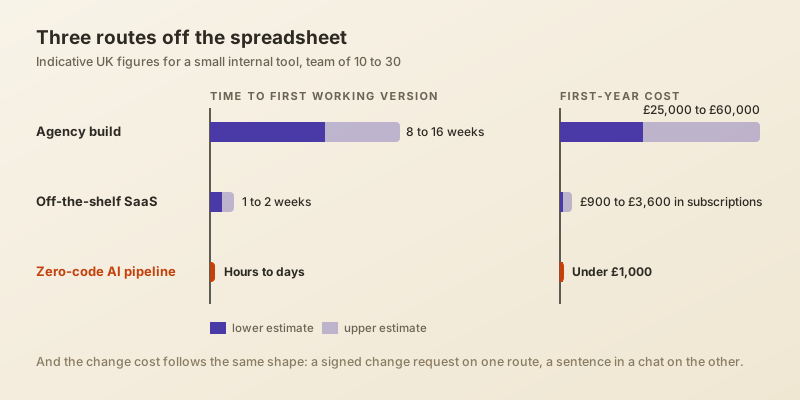
An SME that outgrows its spreadsheet traditionally faces a custom agency build at £25,000 to £60,000 over three to six months, a monthly retainer for changes, or an off-the-shelf subscription that bends your process to its template, a trade-off we unpack in our comparison of custom AI development and off-the-shelf tools.
| Route | First working version | Indicative first-year cost | Cost of a change |
|---|---|---|---|
| Agency build | 8 to 16 weeks | £25,000+ | A change request, then days of waiting |
| Off-the-shelf SaaS | 1 to 2 weeks | £900 to £3,600 | A feature request, possibly never |
| Zero-code AI pipeline | Hours to days | Under £1,000 | Minutes of prompting |
The headline saving gets the attention, but the deeper shift is the cost of change. When a tweak costs a sentence instead of a signed change request, experimentation becomes rational. You can afford to build the wrong first version, because the second version is twenty minutes away.
Where Zero-Code AI Pipelines Stop
Zero-code is a boundary, not a religion, and honest boundaries keep it useful:
- Customer-facing products with real traffic need engineering for performance, security and reliability.
- Payments, financial records and regulated data need professional review before launch, not after.
- Deep integrations with legacy systems still involve real plumbing.
- Prototypes default to convenience: someone must think about access, backups and data location before live data arrives.
- Generated code is quick to create and easy to orphan. Every tool needs a named owner.
There is also a well-documented gap between a prototype that works and a system a business depends on, which we analysed in our piece on the AI ROI trap. A useful rule of thumb: an internal tool with fewer than twenty users and a survivable failure mode sits squarely in zero-code territory. Beyond that, the prototype becomes the brief you hand to professionals: the cheapest, clearest brief you will ever produce.
How to Start This Week
- Pick one spreadsheet that hurts: multiple editors, chasing by email, at least one error that embarrassed someone.
- Write a one-page plain-English brief covering the roles, the stages, the rules and the red lines.
- Spend one afternoon prototyping, and treat the first version as disposable.
- Run a two-week parallel pilot with two or three colleagues, spreadsheet intact as the safety net.
- Decide deliberately: adopt it with guardrails, commission hardening, or archive it and keep the lessons.
Conclusion: From Rows and Columns to Real Software
The spreadsheet was never the mistake. For thirty years it was simply the only software a non-technical team could build for itself. That constraint has gone. When a working internal tool costs an afternoon plus a clear description of your own business, the default flips from “make do with the grid” to “build the tool and see”. Start with the file everyone fears, and find out how much of your operation was software all along. If you want a second pair of eyes on which spreadsheet to convert first, and which genuinely needs engineering, that is the judgement call AI Native Agency helps UK SMEs make.
Frequently Asked Questions
- What is a zero-code AI pipeline?
- A workflow where you describe an internal tool in plain English and an AI model generates the working software: interface, database and logic together. Unlike drag-and-drop no-code builders, the specification is a conversation, so changes are requests rather than rebuilds.
- Can AI really turn a spreadsheet into a web app?
- Yes, for the structural part. Column headers and example rows give the model enough to generate a database and interface, and most tools import your CSV directly. The judgement your spreadsheet hides, such as pricing rules, still has to be written down as plain rules.
- Which tools should a non-technical founder try first?
- Claude suits reasoning through the workflow and producing a first working version, while Lovable, Bolt.new, v0 and Replit generate hosted apps you can share with a link. Pick one and bring a real spreadsheet.
- How much does it cost to replace a spreadsheet with a custom internal tool?
- A working prototype typically costs under £100 a month in subscriptions. Professional hardening usually lands in the low thousands, while a traditional agency build for the same scope starts around £25,000.
- Is business data safe in an AI-built tool?
- Pilot with anonymised data, check where the tool hosts its data if UK GDPR applies, and add logins and roles before anything sensitive arrives. Business tiers of the major AI platforms let you keep your data out of model training.
- When should an SME hire developers instead?
- When the tool faces customers, touches payments or regulated data, needs deep legacy integration, or must survive heavy concurrent use. Bring your prototype to that engagement: it is the clearest specification a developer will ever receive from you.