AI Trends
Generative UI (GenUI) Explained: The Era of Interfaces That Build Themselves
15 min read
Generative UI builds the screen around the job you are doing, then clears it away when you are finished. This plain-English guide uses a restaurant analogy and an invoice-chasing example to show what that feels like to use, how it adapts to beginners and experts, and where it goes wrong.
✦Key Takeaways
- Generative UI treats the screen as an output rather than a place: the app assembles a workspace for your current task, then clears it away when the task is done.
- The best mental model is a personal chef rather than a printed menu. The chef still cooks from a fixed kitchen, which is why well-built GenUI composes from trusted, pre-approved components instead of inventing new ones.
- Intent does not have to be a typed prompt. A click on an overdue badge or a spoken request can trigger a generated workspace, so Generative UI is not the same thing as a chat window.
- Pendo found that 80% of features in the average software product are rarely or never used. Generative UI tackles that clutter by showing only the controls a task needs, without deleting a single feature.
- The same task can produce two very different screens: guided and spacious for a beginner, dense and keyboard-driven for a power user, built on the same data and the same business rules.
- Adaptive interfaces have failed before. A 2004 study found static menus were faster than adaptive ones, so good Generative UI keeps navigation fixed and generates only the workspace inside it.
- In Google's research, people preferred generated interfaces over standard chatbot formatting in 82.8% of comparisons, but generation could take a minute or two. Speed, not quality, is the constraint today.
- The practical starting point for a business is one high-friction, multi-screen task with a clear finish line, not a redesign of the whole product.
You open your accounting software to do one thing: chase the customers who have not paid. Twenty minutes later you have visited the dashboard, the sales tab, the invoices list, a filter panel, a date picker and seven separate customer records, copying amounts into seven separate emails. The software had every feature you needed. It just made you go and find them.
Generative UI (GenUI) is a way of building software where the app's screen automatically shapes itself in real time to fit what you are trying to do right now, rather than forcing you to navigate through static, pre-made menus and dashboards. You say what you want, the interface assembles the exact workspace for that job, and it clears away when you are done.
We have already covered how Generative UI works under the hood: the models, the component libraries and the pipeline. This guide is about the other side of the glass. It explains what it is actually like to use software that builds itself around you, why that matters for the people using your product, and where the idea breaks down. No code required.
What Is Generative UI? A Plain-English Definition
For decades, software has been built like an office building. Designers decide in advance where every room goes, developers put up the walls, and every user walks the same corridors to reach what they need. If the feature you want lives in the back office on the third floor, that is where you walk, every single time.
Generative UI reverses the direction of travel. Instead of you going to the feature, the feature comes to you. The app reads what you are trying to achieve, pulls together the data and controls that goal needs, and lays them out on screen as a temporary workspace. The screen stops being a fixed place you navigate and becomes something the software produces on demand, for one person and one task.
It helps to be clear about what this is not. It is not a chatbot that describes your data in paragraphs. It is not a theme switcher, and it is not the rule-based personalisation most apps already have, where an admin sees an extra menu. The output of Generative UI is a working interface: real tables, real buttons and real forms, wired to real data and arranged for the job in hand.
This is already shipping, not a concept deck
The idea moved from research into mainstream products over the past year. In November 2025, Google Research described a Generative UI system that designs and codes a custom interactive response for each prompt, and rolled it out in the Gemini app as "dynamic view" and in AI Mode in Google Search. A month later Google open-sourced A2UI, a format that lets AI agents describe an interface which your own app then draws with its own components.
In January 2026, MCP Apps, built by the Model Context Protocol maintainers together with OpenAI and the MCP-UI project, standardised a way for tools to return interactive dashboards and forms that render directly inside Claude, ChatGPT and other AI clients. The plumbing now exists in products people already use every day. For most businesses the open question is no longer whether interfaces can build themselves. It is which of their own screens should.
The Restaurant Analogy: Printed Menu vs Personal Chef
The easiest way to feel the difference between static software and Generative UI is to go out for dinner.
Traditional software is the printed menu
Picture a huge restaurant where every customer receives the same ten-page booklet listing 200 dishes. It does not matter whether you are vegan, allergic to nuts or just want a glass of water. You get the full booklet, and you flip through every page to hunt down what you need. The menu is not badly made. It is thorough, carefully organised and identical for everyone, and that is exactly the problem.
That is how most business software works. Your CRM, your accounts package and your HR system hand every user the same navigation, the same dashboards and the same settings pages. The features you need are in there somewhere, sitting alongside hundreds you will never touch.
Generative UI is the personal chef
Now imagine sitting down with a personal chef instead. You tell them what you feel like eating, and they place only the exact dish, cutlery and glass you need on your table. There are no cluttering items, no unnecessary options and no searching. If you want dessert later, you ask, and a dessert spoon appears.
That is the shift Generative UI makes. The conversation moves from "where is the thing I need?" to "here is what I am trying to do". The software, like the chef, takes responsibility for bringing you the right tools at the right moment.
Where the analogy gets more interesting
Two details of the chef picture matter more than they first appear.
First, the chef still cooks from a stocked kitchen. They do not invent new ingredients at the table. Well-built Generative UI works the same way: the AI chooses and arranges components your team has already designed, tested and branded, such as tables, email editors and buttons. A2UI makes this explicit, because the app keeps a catalogue of trusted, pre-approved components and the agent can only request items from that catalogue. That is what stops a generated screen from looking off-brand or behaving unpredictably.
Second, some diners like the menu. Browsing is how you discover the dish you did not know you wanted. Software is no different. A purely prompt-driven app hides its own capabilities, because nobody can ask for a feature they do not know exists. The best Generative UI products keep a menu available for browsing and use the chef for everything else.
What Happens When You Use Generative UI: The Three Moments
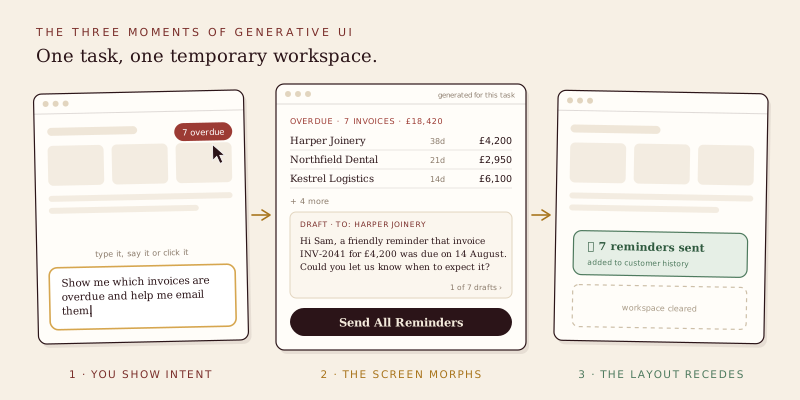
Instead of moving through fixed pages, your experience with Generative UI follows three natural moments. The overdue invoice job from the opening is a good way to walk through them.
Moment 1: You show intent
Everything starts with you signalling what you want. You might type a request such as "Show me which invoices are overdue and help me email them". You might say it out loud to a voice assistant. Or you might simply click a red "7 overdue" badge on your home screen.
That last example matters, because it shows Generative UI is not the same thing as chat. A click, a selection, a file dropped onto the screen or a notification you tap can all express intent. The prompt box is one way in, not the only one, and many of the most useful generated workspaces are triggered without anyone typing a word.
Moment 2: The screen morphs for that specific task
Rather than taking you to a generic "Accounting Dashboard" with dozens of irrelevant buttons, the application temporarily builds a custom workspace right in front of you. For the invoice job, it presents only three things:
- A short list of the overdue invoices, showing the customer, the amount and how many days late each one is.
- A pre-drafted email for each customer, with their invoice number, amount and due date already filled in.
- A single "Send All Reminders" button.
Behind the scenes, the system has queried your ledger, found the unpaid invoices past their due date, chosen the right components from the design library and filled them with live data. You did not open a filter panel, and you did not copy a single figure by hand.
The workspace stays live and responds to follow-up requests. You might say "Make the Harper Joinery email gentler, they have been a customer for nine years", and only that one draft changes. You might remove an invoice because you know the cheque is in the post. Nothing is sent until you press the button, which keeps a human in the loop for anything that goes out under your name.
Moment 3: The layout recedes when you are finished
Once the reminders are sent, the list, the drafts and the button disappear. Your screen returns to a clean state, ready for your next goal. There is no half-used report left open and no filter you forgot to reset before the next person uses the system.
Receding does not mean vanishing without a trace, though. The outcome stays: the reminders appear in each customer's history, the invoices are marked as chased, and the audit log records who sent what and when. The scaffolding goes; the work remains.
There is a useful side effect here too. If you chase late payers every Monday, a good system will offer to keep that workspace as a saved view. Generated screens that prove their worth can graduate into permanent features, which is a far better way of deciding what to build than a roadmap meeting based on guesswork.
How Generative UI Changes the Experience for Users
Seen from the user's chair, the three moments add up to three changes that matter far more than the technology behind them.
No more clutter
Most software is cluttered for an understandable reason: every feature someone once needed has to live somewhere. Pendo's Feature Adoption Report, based on usage data across 615 of its customers' software products, found that 80% of features in the average product are rarely or never used. Those features still take up menu space, still appear in settings, and still compete for attention with the few things each person actually came to do.
Generative UI tackles clutter without deleting anything. Every feature still exists in the product; it simply stays off screen until a task calls for it. You only ever see the controls relevant to what you are doing in that moment. For the person chasing invoices, payroll settings, VAT returns and stock reports are nowhere to be seen, because none of them help with the job in hand.
The benefit is not just visual tidiness. Every extra option on screen is a small decision the brain has to make and dismiss. Removing the irrelevant options makes the relevant ones faster to find and harder to get wrong.
It adapts to your experience level
A beginner and a seasoned power user rarely want the same screen, even when they are doing exactly the same task. Static software has to pick one. Usually it designs for the middle and serves nobody particularly well.
With Generative UI, the same task can produce two different workspaces. A beginner chasing overdue invoices sees a clean, spacious layout: a few large cards, plain-English guidance on what each option does, and one obvious next step. A finance manager who does this every week gets a dense table with bulk selection, filter shortcuts, keyboard commands and the ability to adjust payment terms inline.
The system can work out which is right from simple signals: a preference you set, your role, how often you perform this task and whether you tend to reach for shortcuts. The data and the business rules underneath are identical. Only the surface changes.
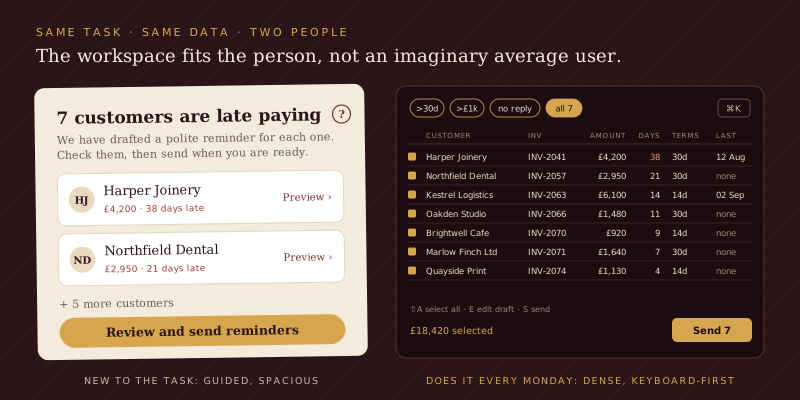
Designers have chased this goal for decades. The classic technique is progressive disclosure, which Nielsen Norman Group describes as showing people a few of the most important options first and offering specialised ones only on request. Progressive disclosure has to make that call once, for everyone, at design time. Generative UI can make it per person and per task, and it can keep adjusting as the beginner turns into an expert.
The same flexibility helps with accessibility. A user who needs larger text, simpler language or fewer moving parts can receive exactly that layout by default, rather than digging through settings pages to switch it on.
Zero learning curve (almost)
Every business knows the cost of teaching people new software: onboarding tours, training sessions, help articles and the one colleague everyone asks where a setting is hidden. Most of that effort exists to answer a single question: where do I find the feature?
Generative UI removes most of that question. You no longer need multi-step tours or manuals to learn which sub-menu hides the bulk email tool, because the app brings the tool to you when you describe the job. New starters become productive on day one, and experienced staff stop losing time to features they use once a quarter and never remember how to find.
The honest caveat sits in the word "almost". The learning does not disappear entirely; it moves. Instead of learning where things are, people need to learn what they can ask for. A blank prompt box is its own kind of barrier, which is why good Generative UI products offer suggested actions, worked examples and one-click starting points rather than a cursor blinking in an empty field.
Where Interfaces That Build Themselves Go Wrong
None of this is free, and Generative UI has a few well-documented failure modes. Knowing them is the difference between an interface that feels helpful and one that feels unstable.
Moving targets break muscle memory
Adaptive interfaces are not new, and their history is a warning. Microsoft Office 2000 introduced personalised menus that hid the commands you had not used recently. The idea was sensible, but menus that changed shape under people's hands proved disorienting, and the feature disappeared when the Ribbon arrived in Office 2007. A 2004 study by Leah Findlater and Joanna McGrenere at the University of British Columbia compared static, adaptive and user-customisable menus with 27 participants. The static menu was significantly faster than the adaptive one, and most participants preferred the version they could customise themselves.
The lesson is not that adaptation fails. It is that people rely on things staying where they left them, and they want a say in what changes. Good Generative UI keeps the frame stable: the navigation, the home screen and the core buttons stay put, and only the workspace inside them is generated. Users can pin, switch or reset a layout at any time. The chef changes what is on the plate, not where the table is.
Speed is the current bottleneck
Generating an interface takes longer than loading one that already exists. In Google's paper Generative UI: LLMs are Effective UI Generators, human raters preferred the generated interfaces over standard chatbot-style markdown in 82.8% of comparisons, rising to 90.5% for information-seeking questions. Those ratings deliberately ignored generation time, however, and the authors note that generation can often take a minute or two. Streaming the result, so people can start using a partly built page, roughly halves that wait. Pages built by human experts were still preferred overall, with the generated versions at least comparable in half of cases.
For a one-off analysis that would otherwise take twenty minutes of clicking, waiting a few seconds for a tailored workspace is a bargain. For a screen someone opens fifty times a day, a pre-built layout that loads instantly will usually win.
A confident screen can still be wrong
A generated table looks every bit as authoritative as a hand-built one. If the system misreads your intent and includes an invoice that has already been paid, the mistake arrives in a polished layout that invites trust. When that workspace can send emails or move money, the consequences are real. Generated workspaces need visible data sources, confirmation before anything irreversible, and a full log of what was done and by whom.
Some screens should stay static
Login pages, checkout flows, regulated forms and anything used under time pressure, such as a till in a busy shop, benefit from being exactly the same every time. Predictability is a feature. Generative UI belongs where tasks vary, the data is rich, and the static alternative involves a lot of hunting.
What Generative UI Means for Your Business
For most organisations, Generative UI is not a rebuild. It is a new layer that sits alongside the screens you already have. These are the practical steps we recommend.
- Find one high-friction task. Look for jobs where staff visit five or more screens, copy data between them and finish with a clear outcome. Chasing late payments, preparing a customer renewal, triaging support tickets and assembling a weekly report are common candidates.
- Get the kitchen in order. Generated workspaces are only as good as the components and data they draw on. Clean APIs, sensible permissions and a consistent component library matter more than the choice of AI model.
- Keep the frame fixed. Generate the workspace, not the navigation. People should always know where home is.
- Put a human on every irreversible action. Draft, preview, confirm, then act, and log each step.
- Measure against the old way. Track time to complete, clicks, errors and support requests for the generated workspace against the static baseline. If it is not faster, it is not finished.
If your product already exposes its data and actions through an MCP server, you have a head start. With MCP Apps, the same tools can return interactive workspaces that appear inside Claude and ChatGPT, meeting customers in the assistants they already use. That matters more every month as more customers start their journey in an AI assistant rather than on your website or in your dashboard.
Conclusion: The Menu Is No Longer the Front Door
For decades, using software meant learning its map. Generative UI turns that around: you describe the destination, the software builds the route, and it clears the route away once you arrive. Clutter falls away, the interface fits the person using it, and the question of where a feature lives stops mattering.
The menu will not disappear. People still need a stable frame, a way to browse and screens that behave the same way every time. But for the varied, multi-step work that fills most of the working day, the personal chef beats the 200-item booklet. The businesses that benefit first will be the ones that pick a single painful task, build a trustworthy workspace for it and measure the difference.
If you want to find the task in your own product or operations where Generative UI would pay back fastest, talk to AI Native Agency. We will help you choose the right starting point, build it within your existing stack and prove the result against the way you work today.
Frequently Asked Questions
- What is Generative UI in simple terms?
- Generative UI is software whose screen is assembled on demand for the task you are doing, instead of being designed once and shown identically to everyone. You state what you want by typing, speaking or clicking, and the app lays out only the information and controls that job needs. When the task is finished, that temporary workspace clears away.
- Do I have to type prompts to use Generative UI?
- No. A typed request is one way to express intent, but clicking a notification, selecting some records or tapping a badge such as "7 overdue" can trigger a generated workspace just as well. Many well-designed products pair a prompt box with suggested actions so people never face a blank screen. Chat is an entry point, not a requirement.
- How does Generative UI know whether I am a beginner or an expert?
- It uses signals the product already has: preferences you set, your role, how often you perform a task and whether you reach for advanced features such as keyboard shortcuts. A newer user might get a spacious, guided layout while an experienced one gets a dense table with bulk actions. Good systems let you switch between the two, so the adaptation never becomes a trap.
- Will a screen that keeps changing make software harder to use?
- It can, if it is done badly. Research on adaptive menus found that static menus were faster, because people rely on things staying where they left them. The fix is to keep navigation, the home screen and core controls fixed, and to generate only the workspace for the current task: a stable frame with flexible contents.
- Is Generative UI safe for actions like sending emails or making payments?
- It can be, provided the generated workspace drafts and previews actions rather than executing them automatically. Anything irreversible should require explicit confirmation, show the data it is based on and be written to an audit log. The AI assembles the tools, but a person decides when to use them.
- Which products use Generative UI today?
- Google's Gemini app uses Generative UI for its dynamic view, which designs and codes a custom interactive response for each prompt, and Google has brought the same approach to AI Mode in Search. Claude, ChatGPT and other AI clients support MCP Apps, which let tools display interactive dashboards and forms inside the conversation. Google's open-source A2UI format lets agents describe interfaces that any app can draw with its own components.
- Can Generative UI be added to existing software without rebuilding it?
- Usually, yes. Most businesses add it as a layer, such as a command bar or assistant panel that assembles workspaces from existing data and components, while the current screens stay as they are. The main prerequisites are reliable APIs, clear permissions and a consistent set of interface components. Starting with one high-friction task keeps the investment small and the results measurable.
- What is the difference between Generative UI and personalisation?
- Traditional personalisation follows rules written in advance, such as showing an extra panel to admins or reordering a list by recent activity. Generative UI decides what to show at the moment of use, based on the specific task, and can produce a layout nobody designed ahead of time. Personalisation adjusts a fixed screen; Generative UI builds the screen.