Model Context Protocol (MCP) is becoming the standard way AI assistants connect to external tools and data. This guide explains what an MCP server is, how it works, and why UK SaaS companies that ship one in 2026 gain a distribution advantage that compounds over time.
✦Key Takeaways
- MCP (Model Context Protocol) is an open standard that lets AI assistants like Claude, Cursor, and GitHub Copilot connect to your SaaS product's data and actions through a single protocol.
- Without an MCP server, your product is invisible inside the AI interfaces your users spend their working day in.
- MCP exposes three primitives: Tools (actions), Resources (data), and Prompts (workflow templates), all discoverable by any MCP-compatible AI client.
- UK SaaS companies are underrepresented in the MCP ecosystem, making 2026 a first-mover window before the market saturates.
- A basic MCP server for five to ten tools takes one to two developers roughly three to five days using the official TypeScript or Python SDK.
- Stripe, GitHub, Linear, and Sentry have already shipped MCP servers, turning their products into ambient capabilities inside every AI workflow.
The next wave of SaaS distribution is not happening through app stores or integrations marketplaces. It is happening through AI assistants. And the protocol that makes it possible is called MCP.
Model Context Protocol (MCP) was open-sourced by Anthropic in November 2024 and has since become the fastest-adopted AI integration standard since the OpenAI API itself. GitHub, Stripe, Linear, Sentry, and Cloudflare all ship MCP servers. OpenAI announced support in early 2025. Every major AI-powered IDE is adding MCP compatibility. If your SaaS product does not have an MCP server in 2026, you are invisible to the tools your users spend eight hours a day inside.
This post explains what MCP is, how it works, and why building an MCP server is the highest-leverage technical investment a UK SaaS company can make right now.
What Is MCP and Why Does It Exist?
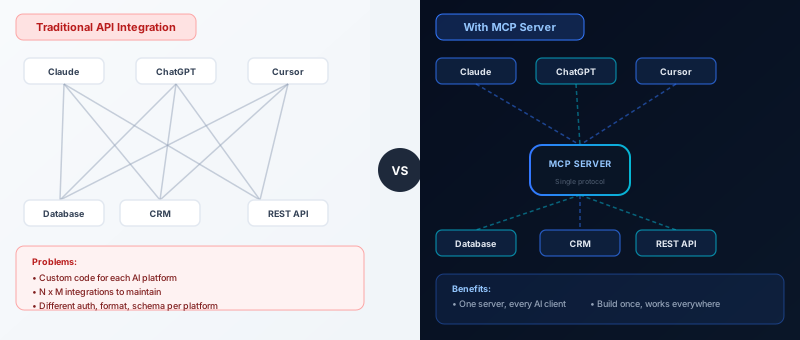
MCP stands for Model Context Protocol. It is an open protocol that standardises how AI models connect to external data and tools. Before MCP, every AI integration was bespoke: you wrote a custom plugin for ChatGPT, a separate tool definition for Claude, and a third connector for your internal AI agent. Each used a different format, authentication model, and maintenance burden.
Anthropic built MCP to solve this fragmentation. The goal was a single standard that any AI model and any data source could implement, so that an AI assistant could query your database, trigger an action in your product, or retrieve context from your CRM without custom glue code per AI platform.
The analogy that has stuck in the developer community is USB-C. Before USB-C, every device needed its own cable and adapter. After USB-C, one port connects everything. MCP is USB-C for AI integrations: one server, every AI client.
How MCP Actually Works
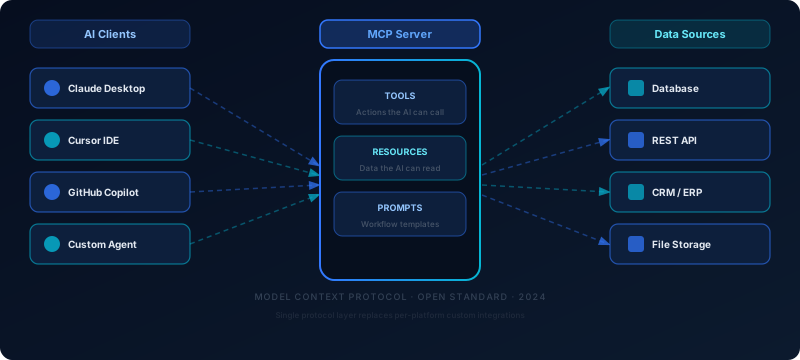
An MCP server is a lightweight process that exposes three types of primitives to any connected AI client:
- Tools are functions the AI can call to take an action. For a project management SaaS, a tool might be
create_task,update_status, orget_project_summary. The AI decides when to invoke these based on user intent, exactly the way a developer calls an API. - Resources are read-only data the AI can access contextually. For a CRM, resources might be customer records, deal histories, or pipeline reports. The AI pulls this context to inform its responses without the user needing to paste data manually.
- Prompts are templated instruction sets that users or AI clients can invoke for common workflows. For an accounting SaaS, a prompt like
generate_monthly_reportcould walk the AI through the right sequence of tool calls and formatting rules.
The AI client (Claude Desktop, Cursor, GitHub Copilot, or a custom agent) connects to your MCP server at startup, discovers your available tools and resources, and uses them autonomously whenever they are relevant to the user's request. The user configures nothing beyond the initial connection. The AI simply knows what your product can do.
Why This Is a Distribution Problem, Not a Technical One
Here is the commercial reality your product team needs to understand: your users are spending a growing share of their working day inside AI interfaces. Cursor for code, Claude Desktop for writing and research, GitHub Copilot for code review, and custom internal agents for customer support and operations workflows.
If your SaaS product does not appear as a native capability inside those interfaces, you have an invisible product. Your competitor who ships an MCP server this quarter will be natively accessible from every tool your shared users already rely on, without asking anyone to open a new tab or switch context.
Stripe understood this immediately. Their MCP server exposes tools for querying charges, creating payment links, retrieving customer data, and generating financial summaries. A developer using Claude Desktop can type "show me last week's failed payments over £500" and get a real answer from live Stripe data, without leaving their AI interface. That is not a developer experience nicety. That is a retention and stickiness mechanism.
GitHub's MCP server lets AI assistants search repositories, read issues, create pull requests, and comment on code reviews. Linear's MCP server connects project context directly into developer workflows. Sentry's surfaces error traces into wherever the developer is working. In each case, the product becomes ambient: always available, always in context, never requiring a context switch.
The UK SaaS Opportunity
UK SaaS companies are underrepresented in the MCP ecosystem right now. A scan of the public MCP marketplace surfaces mostly US-built servers. That gap is a first-mover opportunity. Fintech SaaS products with transaction data, compliance tools with regulatory context, legaltech platforms with contract repositories, and developer tooling companies all have rich structured data that AI assistants would use constantly if it were available through MCP.
The development effort is measured in days using the official TypeScript or Python SDK from Anthropic. The distribution return is measured in every AI-powered workflow your users run, indefinitely.
What Building an MCP Server Actually Involves
Anthropic publishes official SDKs in TypeScript and Python, with a community Go port also available. A basic MCP server for a SaaS product with five to ten tools takes one to two developers roughly three to five working days to ship.
- Define your tools with a name, description, and JSON schema for input parameters. This is the most important step: describe each tool clearly so the AI knows when and how to use it.
- Implement the handler function for each tool by calling your existing APIs or database queries. If you already have a REST API, your MCP tools are thin wrappers around it.
- Register resources for any data the AI should be able to read contextually, such as user account data, recent activity, or configuration settings.
- Package and serve the server locally via stdio for desktop AI clients, or remotely via HTTP and Server-Sent Events for cloud agents and browser-based AI tools.
Authentication connects to your existing patterns. OAuth 2.0 for user-scoped access, API keys for service accounts. MCP does not invent a new auth model; it plugs into whatever you already have.
The most consequential design decision is what to expose. Good MCP servers surface tools that match genuine user intent: the tasks a user would naturally ask an AI to do on their behalf. Exposing every API endpoint as a raw tool creates noise that degrades AI performance. Spend time on tool design before writing a line of code.
What UK CTOs Should Do This Quarter
The practical path forward is clear. Start with an MCP use-case audit: list the five to ten things a power user would ask an AI assistant to do inside your product if it were possible. That list is your tool manifest.
Next, build a basic MCP server using the Anthropic TypeScript or Python SDK, test it against Claude Desktop, and ship it to a closed beta of developer users. Gather feedback on which tools they reach for most. Then submit to the MCP servers directory and relevant developer directories so your server is discoverable by anyone configuring their AI environment.
The MCP ecosystem is still early enough that shipping a well-designed server puts you among the first wave of UK SaaS products with native AI assistant distribution. That window will not stay open indefinitely.
Conclusion
MCP is not a trend for AI researchers. It is a distribution channel for SaaS products, and it is open right now while adoption is still early. UK SaaS companies that ship MCP servers in 2026 will have their products natively embedded in the AI interfaces their users rely on every day. Those that wait will be retrofitting a capability their competitors already treat as standard.
The protocol is open, the SDKs are production-ready, and the user demand is already there. If your AI strategy is still taking shape, our post on domain-specific AI as a competitive moat is a useful next read, and for teams thinking about where humans should stay in the loop once your MCP server is live, see our guide to Human-in-the-Loop AI consulting.
Frequently Asked Questions
- What is an MCP server?
- An MCP server is a lightweight process that implements the Model Context Protocol, an open standard created by Anthropic in 2024. It exposes your product's data and actions to AI models through a standardised interface, so AI assistants can query your data and trigger actions in your product without custom per-model integrations.
- Who created MCP?
- Anthropic open-sourced the Model Context Protocol in November 2024. Since then, it has been adopted by major companies including Stripe, GitHub, Linear, Sentry, and Cloudflare. OpenAI also added MCP support to its platform in early 2025, making it a genuine cross-vendor standard.
- Does my SaaS product need an MCP server?
- If your users are developers, knowledge workers, or anyone who uses AI assistants in their daily workflow, an MCP server is increasingly important. Without one, your product is invisible inside the AI tools your users spend their time in, including Cursor, Claude Desktop, GitHub Copilot, and any custom AI agents they build.
- How long does it take to build an MCP server?
- For a SaaS product with five to ten well-defined tools, a competent developer can ship a working MCP server in three to five working days using the official TypeScript or Python SDK from Anthropic. A production-grade server with authentication, error handling, and remote hosting adds roughly another week.
- Is MCP only for Claude?
- No. MCP was created by Anthropic but is an open protocol that any AI client can implement. OpenAI, Google Gemini, and a growing list of open-source model providers have added support. Any AI client that implements the MCP specification can connect to your server, regardless of the underlying model.
- What is the difference between an MCP server and a traditional API?
- A traditional API requires each AI platform to write a custom integration layer. MCP provides a single standard both sides implement once. The key difference is semantic context: an MCP server describes what your tools do and when to use them, so the AI can invoke them autonomously based on user intent rather than requiring explicit endpoint calls.
- Can I self-host an MCP server?
- Yes. MCP servers can run locally via stdio for desktop AI clients like Claude Desktop or Cursor, or be hosted remotely via HTTP and Server-Sent Events for cloud-based agents and browser clients. Remote hosting is preferred for production SaaS integrations since it allows all users to connect without local setup.
- Are there security risks with MCP?
- Like any API, MCP servers require careful attention to authentication and authorisation. Use OAuth 2.0 or API keys with appropriate scopes, validate all inputs on the server side, and apply rate limiting. Never expose write operations without explicit user consent flows. Anthropic publishes a security guide for MCP server developers as part of the official documentation.