Strategy
Your Staff Already Use AI. Here's the One-Page AI Usage Policy UK SMEs Need
11 min read
Banning ChatGPT rarely works, and ignoring it leaves customer data exposed. This guide shows UK SMEs how to turn shadow AI into safe, approved use with a one-page AI usage policy: a data traffic light, business accounts instead of personal ones, a duty to check outputs and a 30-day rollout plan, with a template you can copy.
✦Key Takeaways
- Shadow AI is common: in Deloitte's 2026 survey of 25,000 UK workers, 31% of people using generative AI at work said they do so without their employer's permission.
- Bans rarely remove the need for AI. They push it onto personal phones and accounts, where the business has no contract and no visibility.
- The biggest risk is the account, not the AI. Business plans from major vendors come with a data processing agreement and keep your content out of model training; a personal account gives your business neither.
- Classify data, not tools: public information can go into any approved tool, internal information only into company accounts, and personal or confidential data only where a specific use is approved in writing.
- Make mistakes blame-free to report, so a pasted customer list surfaces in minutes rather than months.
- You can move from shadow AI to a working policy in 30 days: find out what people use, pave the path with business-plan tools, publish and teach, then name an owner and a review date.
Somewhere in your business this week, someone pasted a customer's email into a free AI chatbot to get a reply drafted faster. It probably worked. It also handed that customer's details to a company you have no contract with, through an account you cannot see.
That is shadow AI, and it is now ordinary. In Deloitte's 2026 survey of 25,000 UK workers, 31% of people using generative AI at work said they do so without their employer's permission, and 46% use free tools. Managers can see it happening. In a Censuswide poll of 500 UK managers and executives for Studio Graphene, 48% knew or suspected that staff were using unapproved AI tools, and 34% said their organisation had no formal AI policy.
The answer is not a ban, and it is not a 20-page document nobody reads. It is an AI usage policy short enough to fit on one page, backed by approved tools good enough that nobody needs the shortcut. Here is how to write one, with a template you can adapt today.
What Shadow AI Is, and Why Banning It Backfires
Shadow AI is any use of AI at work that the business has not approved or does not know about: a personal chatbot account for writing proposals, a free transcription app in client meetings, a browser extension that rewrites emails. It is rarely malicious. People use these tools because they save time, and in many SMEs there is no approved alternative.
The Deloitte data shows how determined people are. One in six UK workers who use generative AI (17%) pay for their own tools, and 22% believe their employer would approve if it knew. Among those paying for their own tools or using ones that may not be approved, 21% say their tools outperform what the company provides.
The instinctive response is a ban. Samsung reached for one in 2023, after an engineer uploaded internal source code to ChatGPT to check it for errors. As KED Global reported, it barred staff in one of its biggest divisions from using generative AI tools at work. Yet even Samsung called the restriction temporary, lasting only until it had built "a secure environment for safely using generative AI".
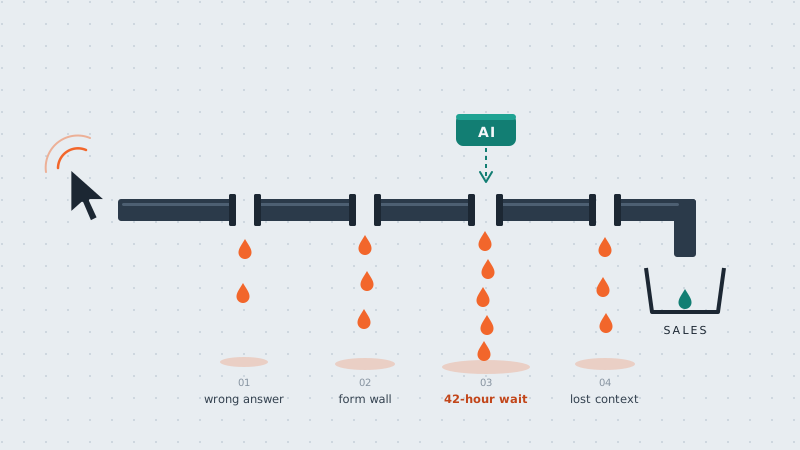
A 25-person firm has no internal team to build that environment, so a ban mostly moves AI use onto personal phones, where you can see nothing. Planners have a name for the muddy shortcut people wear across a lawn: a desire path. Fences and signs rarely stop them. The smarter move is to pave the route people already take, and that is exactly what a good AI usage policy does.
The Real Risks of Shadow AI, in Plain English
Most of the risk comes from whose account is used and what goes into it, not from the AI itself.
Your data lands with a company you have no contract with
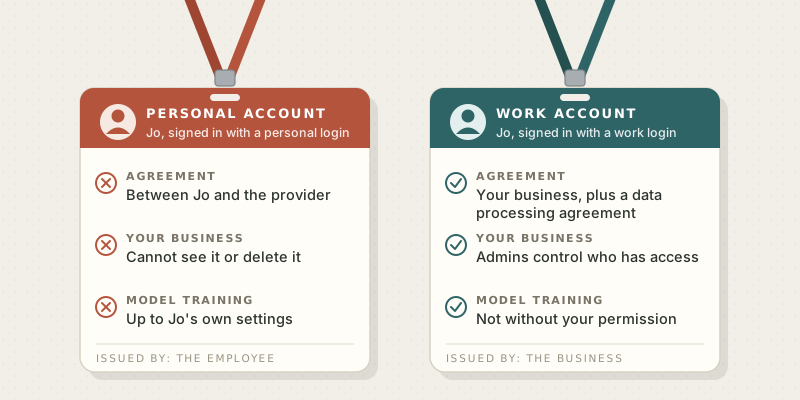
On a personal account, the agreement is between your employee and the provider. Your business gets no data processing agreement, no say over how long anything is kept and no way to delete it. If you want a provider to handle personal data for you, UK GDPR requires a written contract with it, and the ICO sets out what that contract must include. A personal account gives your business nothing of the kind.
Business plans are built differently. Google says Workspace content used with Gemini is "not human reviewed or otherwise used for Generative AI model training outside your domain without permission", and that this use is governed by the organisation's Workspace agreement, including Google's Cloud Data Processing Addendum. The same product can be safe on one plan and risky on another.
The question itself can be sensitive
The National Cyber Security Centre's advice on public chatbots is blunt: do not include sensitive information in queries, and do not submit anything that would cause problems if it were made public. It also warns that a question can be revealing on its own, giving the example of a CEO asking how best to lay off an employee.
Confident answers that are wrong
AI tools write fluent text that can be false. If someone sends AI-drafted figures, contract terms or legal points to a client without checking them, the business owns the mistake. The courts have already dealt with invented case citations, as we covered in our comparison of ChatGPT and custom AI.
Decisions about people
Using AI to screen CVs, score staff or decide on credit raises the stakes. The ICO lists innovative technology, including AI, among the triggers for a mandatory data protection impact assessment (DPIA) when it is combined with another risk factor, such as evaluating or scoring people. Our guide to sovereign AI and GDPR covers the wider data protection picture.
What to Put in Your AI Usage Policy
A policy people follow is short, specific and written for the people doing the work. Three design choices matter more than any clause:
- Classify data, not tools. The same assistant can be fine for polishing a blog post and wrong for summarising a grievance. A rule about data covers every tool your team will ever try.
- Approve accounts, not brands. Name the plan and the login: "Gemini through our Google Workspace account", not just "Gemini".
- Make mistakes cheap to report. Someone who pasted the wrong file should tell you within minutes, not hide it for months. That only happens if reporting is blame-free.
The data traffic light
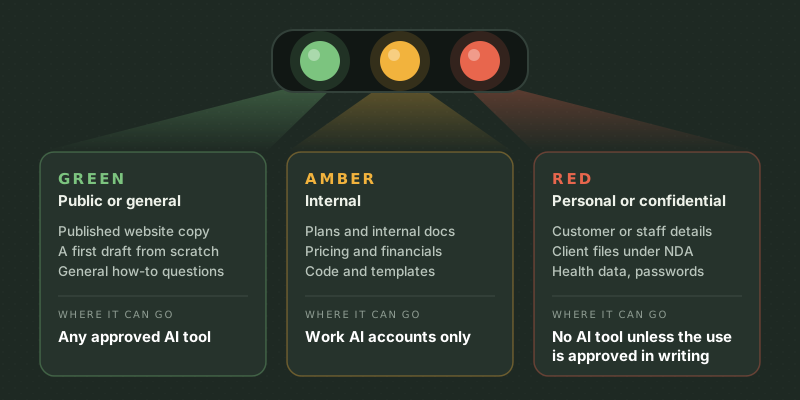
The heart of the policy is one rule about data, sorted into three colours:
- Green, public or general: your published website copy, a first draft from a blank page, a general how-to question. Fine in any approved tool.
- Amber, internal: unpublished plans, internal documents, pricing, financials and code. Company AI accounts only, signed in with a work login.
- Red, personal or confidential: anything about identifiable customers or staff, client material under a confidentiality agreement, health or financial details about individuals, and passwords or keys. Not in any AI tool unless that specific use has been approved in writing.
A one-page AI usage policy template
Copy this, fill in the brackets and send it round. If your version runs past one page, cut it.
Using AI at [Company]: our one-page policy
Owner: [name] · Last updated: [date] · Next review: [date + 6 months]
- We want you to use AI. It can save you hours each week. This page explains how to use it safely.
- Approved tools. Use [tool and plan] and [tool and plan], signed in with your work account. To use anything else, ask [owner] first. We aim to reply within two working days.
- Green data (public or general information) is fine in any approved tool.
- Amber data (internal plans, documents, figures and code) goes into approved tools only, on your work login.
- Red data (personal details about customers or staff, confidential client material, health or financial details, passwords) never goes into an AI tool unless that specific use is approved in writing.
- You own the output. Check facts, figures, names and links before anything leaves the business. Never send AI-written work to a customer unread.
- People decisions stay human. AI can help you draft, but it never decides anything about hiring, pay, performance or credit.
- Mistakes happen. If you have shared something you should not have, tell [owner] straight away. You will not be in trouble for reporting it.
How to Roll Out an AI Usage Policy in 30 Days
A policy only works if it reflects how people actually work. This four-week plan suits most businesses of 10 to 250 people:
- Week 1, find out what people use. Run a short anonymous survey: which tools, for which tasks, on which accounts, and what people would miss most. Check expense claims and card statements for AI subscriptions. Call it an amnesty, because you are mapping demand, not hunting culprits.
- Week 2, pave the path. Choose one or two tools that cover the most common jobs, on business plans. Before you sign, confirm three things: your data is not used for training, a data processing agreement is included, and admins can control who has access. Our AI budget guide for SMEs shows what to set aside.
- Week 3, publish and teach. Send the one page, then run a 30-minute session built on real tasks from your team's week: one green, one amber and one red example. Start a shared library of prompts that work, so good habits spread.
- Week 4, give it an owner. Name the person who approves new tools and uses, keep a simple register of what has been approved and why, and book a review in six months. AI vendors change their terms often, and your page should keep up.
Expect the survey to surprise you. The tools people pay for themselves are your shortlist, and the tasks they describe show where AI is already earning its keep.
When One Page Is Not Enough
One page covers everyday use of AI assistants. You need more if a regulator such as the FCA, SRA or CQC oversees your work, if AI will process personal data at scale or help make decisions about people, or if you are building AI into your products or letting agents act on your systems. That means DPIAs, supplier due diligence and ongoing monitoring. Our blueprint for agentic governance covers the controls for AI that acts rather than chats.
Conclusion
Shadow AI is a signal as much as a risk. It shows you where people need help to work faster. Ban it and the demand goes underground; ignore it and your customer data goes with it. Pave the path instead: approve good tools, set one clear rule about data and make it safe to ask.
Start this week by asking your team which AI tools they use, and listen to the answers. If you would like help choosing tools, writing your policy or training your team, talk to AI Native Agency about our AI strategy and consulting work.
Frequently Asked Questions
- What is shadow AI?
- Shadow AI is the use of AI tools at work that the business has not approved or does not know about, usually free or personal accounts for chatbots, transcription apps and browser extensions. It is widespread: Deloitte's 2026 UK survey found that 31% of people using generative AI at work do so without their employer's permission.
- Does a small business need an AI usage policy?
- Yes, if anyone in the business uses AI tools, and most teams already do. One page is enough for most SMEs: approved tools and accounts, rules for what data can go where, a duty to check outputs and a named person to ask. It protects customer data and gives staff the confidence to use AI well.
- What should an AI usage policy include?
- At minimum: which tools are approved and on which accounts, a simple classification of data, who checks AI output before it leaves the business, limits on using AI in decisions about people, how to request a new tool and how to report mistakes. Give it an owner and a review date so it stays current.
- Can employees put customer data into ChatGPT?
- Not through personal or free accounts, because your business has no contract covering what happens to that data. Customer personal data should only go into tools you have approved, on business plans with a data processing agreement, for uses you have assessed. Share the minimum needed and check whether a DPIA is required.
- Should we ban ChatGPT at work?
- A blanket ban rarely works in a small business. Staff who find AI useful tend to move to personal phones and accounts, where you lose all visibility. It is better to approve a business-grade tool, set clear rules about data and block only the specific uses you cannot make safe.
- Do AI tools train on the information you type in?
- It depends on the plan. Google and Microsoft, for example, say business content in their workplace AI tools is not used to train their models without permission. Personal plans have their own terms and settings, so check them before anything internal goes in.
- How often should we review an AI usage policy?
- Every six months, and whenever you adopt a new tool or a vendor changes its terms. Look at the approved tools list, any mistakes that were reported and the questions people asked, because repeated questions show where the policy is unclear.