SEO & Content
How to Make Your Website Visible to AI Agents (Without Rebuilding Everything)
13 min read
Most sites that are invisible to ChatGPT, Claude and Perplexity fail at one of four specific points, and three of them are configuration you can fix in an afternoon. This guide covers what is actually reading your site, why client-side rendering makes you disappear, and the fixes in order of effort.
✦Key Takeaways
- AI agents are three different things: training crawlers, search and answer crawlers, and user-triggered fetches. Blocking GPTBot stops training and changes nothing about whether ChatGPT can answer questions about you.
- No major AI crawler renders JavaScript. If your content only exists after a client-side render, ChatGPT, Claude and Perplexity receive an empty shell while Googlebot sees a full page, so your analytics show no problem at all.
- Three of the four common failure points are configuration: firewall rules, robots.txt and a stale sitemap. Only server rendering touches the build, and only on the pages that actually sell.
- From 15 September 2026, Cloudflare blocks Training and Agent bots by default on ad-displaying pages for new domains, so your AI visibility now partly depends on infrastructure defaults you never chose.
- Google states there is no special schema.org markup for generative AI features. Add structured data for rich results and entity clarity, not as an AI ranking signal.
- llms.txt has no production support from any major AI provider and Google has said no AI system uses it. Add it if you like tidy files, but do not report it as a strategy.
- Expect influence rather than sessions. AI assistants crawl far more than they refer, so measure with crawler logs, Search Console generative AI reports and monthly prompt tests.
Your website was designed for two audiences: people, and Googlebot. A third one arrived without an invitation and now outnumbers both. In its July 2026 bot report, Cloudflare found that non-human traffic has passed 50% of all internet traffic, and that 52% of crawler requests are now made for AI training, up from 22% in spring 2025. By August, Cloudflare put it more bluntly: over half of HTML requests come from something that is not a person.
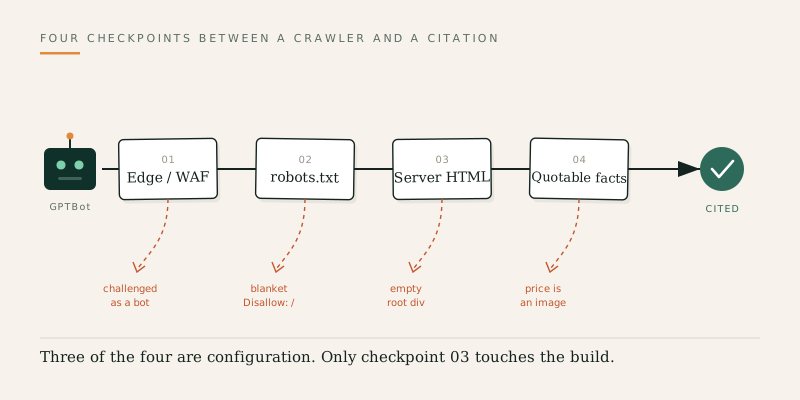
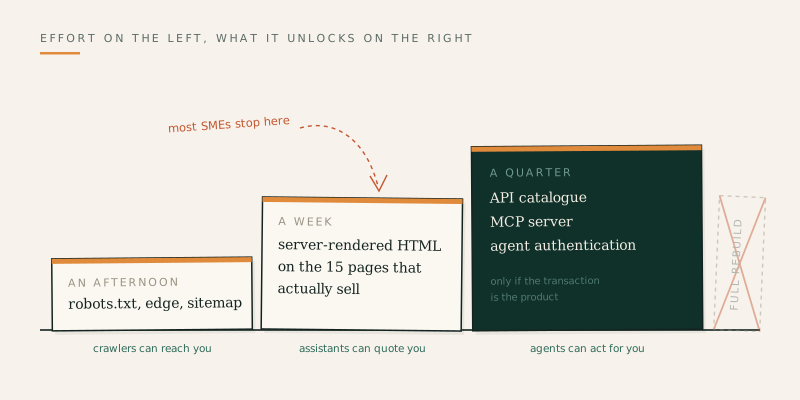
The usual reaction to that number is to assume the site needs rebuilding. It almost never does. Most sites that are invisible to AI agents fail at one of four specific points, and three of the four are configuration problems you can fix in an afternoon without touching your design, your CMS or your framework. The fourth takes about a week, and only for the pages that matter.
This guide is for marketing leads, founders and developers at UK businesses who want their site to be readable, quotable and usable by AI assistants, without a redesign, a migration, or a line item nobody approved. It covers what is actually reading your site, the four ways sites disappear, the fixes in order of effort, and the things that get recommended constantly but do not work.
Three Different Machines Are Reading Your Site
The phrase "AI agent" hides three jobs that behave differently and follow different rules. Treating them as one thing is why so many robots.txt files are wrong.
Training crawlers collect content to train foundation models. This is the traffic most publishers want to control, and blocking it has no effect on whether an assistant can answer questions about you today.
Search and answer crawlers build the index that assistants read from when a user asks a question. This is the traffic that decides whether ChatGPT or Claude can describe your pricing, your services or your location. Block this and you are invisible in the answer layer.
User-triggered agents fetch a page in real time because someone asked. Per OpenAI's crawler documentation, ChatGPT-User handles actions initiated by a user, and because those actions are not automated crawling, robots.txt rules may not apply in the usual way.
Here is who is knocking, and why:
| User agent | Operator | Purpose |
|---|---|---|
| GPTBot | OpenAI | Training foundation models |
| OAI-SearchBot | OpenAI | Surfacing sites in ChatGPT search results |
| ChatGPT-User | OpenAI | User-initiated fetches inside ChatGPT |
| ClaudeBot | Anthropic | Training |
| Claude-SearchBot | Anthropic | Search relevance and accuracy |
| Claude-User | Anthropic | Fetches when a Claude user asks |
| PerplexityBot | Perplexity | Search indexing |
| Google-Extended | Gemini training and grounding controls |
The practical consequence: disallowing
GPTBot protects your content from training but leaves you perfectly visible in ChatGPT's answers. Disallowing OAI-SearchBot and Claude-SearchBot does the opposite. Most sites that have blocked themselves out of AI answers did it by pasting a blanket disallow block from a 2023 article that predates the search bots existing at all. Anthropic's own documentation lists all three of its agents separately for exactly this reason.The Four Ways a Website Goes Invisible
1. Your content only exists after JavaScript runs
This is the big one, and it is invisible in every tool marketers normally use. Joint research by Vercel and MERJ found that none of the major AI crawlers render JavaScript. They fetch JavaScript files happily, 11.50% of ChatGPT's requests and 23.84% of Claude's were JS files, but they never execute them.
If your site is a client-side React, Vue or Angular application, an AI crawler receives an empty shell and a script tag. Your pricing, your case studies and your service descriptions are simply not there. The cruel part is that Googlebot renders JavaScript, so the page ranks normally in Google and can appear in AI Overviews, while ChatGPT, Claude and Perplexity see nothing. Your analytics will show no problem at all.
2. Your robots.txt says no by accident
Many sites added blanket AI blocks during the 2023 scraping backlash and never revisited them. Others inherited them from a theme, a plugin or an agency template. It costs nothing to check, and it is the single highest-value five minutes in this guide.
3. Your edge blocks them before robots.txt is ever read
Bot protection, rate limiting and WAF rules operate before any crawler reads your rules. If your firewall serves a challenge page to non-browser user agents, you are polite in robots.txt and closed in practice. Defaults matter here too: from 15 September 2026, Cloudflare blocks Training and Agent category bots by default on ad-displaying pages for new domains onboarding to Cloudflare, while leaving Search allowed. That is narrower than the headlines suggested, but it is a reminder that your visibility now depends on infrastructure defaults you did not set.
4. The words are there, but the answer is not
A crawler can read the page and still find nothing to quote. Prices in a JavaScript widget, opening hours in a background image, specifications inside a PDF, key facts buried in a carousel: all invisible or unusable. An assistant summarising your page needs a self-contained factual claim it can lift, attribute and stand behind.
Fix It in an Afternoon
Start by finding out what is already happening, then change only what needs changing.
Check your logs before you change anything. Filter your server or CDN logs for
GPTBot, OAI-SearchBot, ClaudeBot, Claude-SearchBot and PerplexityBot over the last 30 days. Zero hits means you are blocked somewhere. Hits returning 403 or 503 means your edge is refusing them.Run the 60-second test. From a terminal, request your most important page as a crawler would and look for content that should be there:
curl -s -A "GPTBot/1.4" https://yoursite.co.uk/pricing | grep -i "£"
If that returns nothing and your pricing page shows prices in a browser, you have confirmed failure point one. Repeat for
OAI-SearchBot and ClaudeBot.Rewrite robots.txt deliberately. Decide per category, not per company. A common, defensible position is to allow the search and answer bots, which is how you get cited, and disallow training:
User-agent: OAI-SearchBot
Allow: /

User-agent: Claude-SearchBot
Allow: /

User-agent: PerplexityBot
Allow: /

User-agent: GPTBot
Disallow: /

User-agent: ClaudeBot
Disallow: /

Sitemap: https://yoursite.co.uk/sitemap.xml
Add content signals. Cloudflare's Content Signals Policy adds a machine-readable preference line to robots.txt covering three uses:
search, ai-input (feeding your content into an AI answer) and ai-train. It expresses intent rather than enforcing it, but it is one line and it makes your position explicit:User-agent: * Content-Signal: search=yes, ai-input=yes, ai-train=no Allow: /
Confirm your sitemap is current. AI crawlers are far less forgiving of link rot than Googlebot. In the Vercel study, 34.82% of ChatGPT's fetches and 34.16% of Claude's hit 404 pages. A stale sitemap wastes most of the attention you are given.
Fix It in a Week
Server-render the pages that matter, not the whole site. This is where teams talk themselves into a rebuild they do not need. You do not need to migrate the application. You need server-rendered HTML for perhaps fifteen pages: services, pricing, locations, key case studies, the top blog posts. In Next.js or Nuxt that is a rendering mode change per route. For a legacy single-page app, a prerender service in front of the site solves it without touching the codebase.
Put the facts in text. Move prices, hours, turnaround times, coverage areas and specifications out of images, widgets and PDFs and into plain HTML. If a fact matters to a buying decision, it must exist as selectable text on a server-rendered page.
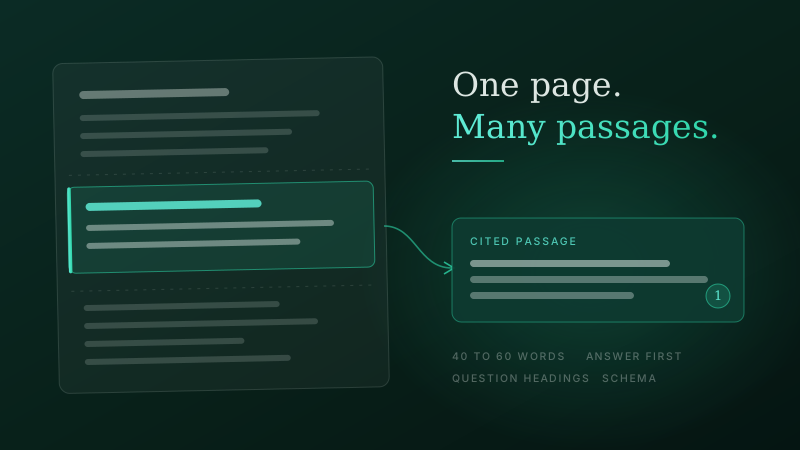
Structure pages so answers can be extracted. Use a question as the heading, then answer it in the first two or three sentences before adding context. This is the same discipline that wins featured snippets, and we cover it in detail in our guide to structuring content for snippets and AI citations.
Be honest about structured data. Google states plainly in its generative AI optimisation guide that structured data is not required for generative AI search and there is no special schema.org markup to add. Add
Organization, Product, FAQPage and LocalBusiness markup because it earns rich results and removes ambiguity about your entity, not because it is a magic AI signal. The same guide notes the harder requirement: a page must be indexed and eligible to appear with a snippet before it can appear in AI features at all.Not sure which of the four failure points your site has? Talk to our team about an AI visibility audit before you budget for anything larger.
Fix It in a Quarter: From Readable to Usable
Everything above makes your site readable. The next tier makes it actionable, so an agent can check stock, book a slot or start a return rather than just describe you. Cloudflare's guidance for the agentic web sets out the ladder: quick wins such as clean robots.txt, sitemaps and Markdown delivery; then groundwork such as an API catalogue and agent login instructions; then integration through the Model Context Protocol, agent authentication and agent commerce standards.
Most UK SMEs should stop after the first two rungs this year. The exception is any business where the transaction itself is the product: ecommerce, bookings, quotes, tickets. If that is you, an MCP server exposing your core actions is worth scoping now, because it is the difference between being described by an assistant and being used by one. We explored where this leads in the rise of the agent-first internet.
What to Skip
llms.txt. The proposed standard suggests a Markdown file summarising your site for language models. It is well intentioned and costs almost nothing, but no major AI provider has committed to reading it in production, and Google has said no AI system currently uses it. Add it if you like tidy files. Do not put it in a report as an AI visibility strategy.
Writing for the machines. Keyword-stuffed, robotic copy performs worse with AI systems, not better, because the models are trained to prefer clear, well-organised writing. Google's advice for generative AI features is to write for your human audience with clear headings and structure.
The rebuild. If a supplier's answer to AI visibility is a new website, ask them which of the four failure points above the current site actually fails, and what the cheapest fix for each one is. There is a legitimate case for rebuilding, and we have written about when retrofitting stops being worth it, but AI crawler visibility on its own is not that case.
How to Tell Whether It Worked
Watch three signals over the following month. First, crawler hits in your logs: successful 200 responses from the search bots, rising over a few weeks as they rediscover the site. Second, Google's Search Console generative AI performance reports, announced in June 2026, which show impressions inside AI Overviews and AI Mode. Third, manual prompt testing: ask ChatGPT, Claude, Gemini and Perplexity the ten questions a real buyer would ask, record what each says about you, and repeat monthly.
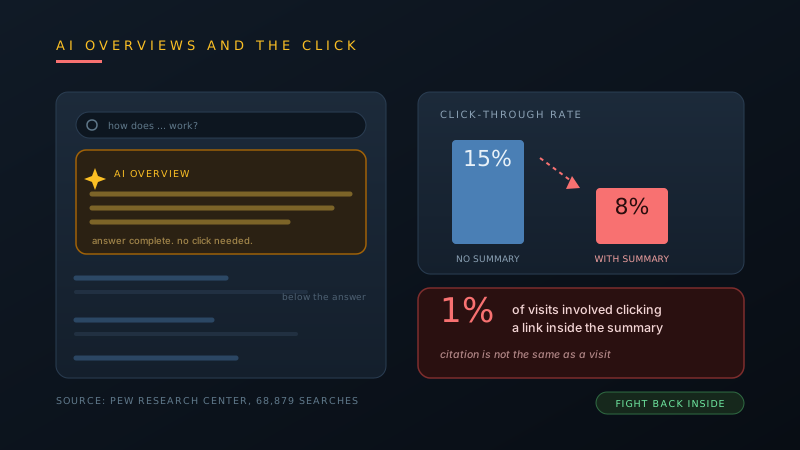
Set expectations about traffic before you start. AI assistants crawl far more than they refer, and being cited in an answer often means the user never arrives. Visibility here buys influence at the moment of decision rather than sessions in your analytics, which is a different thing to measure and a different thing to sell internally. Our analysis of how AI Overviews are reshaping organic traffic covers the trade in more depth.
Conclusion
Being visible to AI agents is not a new discipline bolted onto your website. It is a short list of specific, checkable conditions: your HTML contains your content without JavaScript, your robots.txt distinguishes training from search, your firewall lets the search bots through, and your key facts exist as text an assistant can quote. Four checks, most of them free.
Run the curl test on your three most important pages this week. If the content is missing, you now know exactly which of the four failure points to fix, and roughly what it costs. That is a considerably better place to start than a redesign. If you would rather have someone run the audit and the fixes for you, get in touch.
Frequently Asked Questions
- How do I check if AI agents can see my website?
- Request your most important page with a crawler user agent and look for content that should be there, for example curl -s -A "GPTBot/1.4" https://yoursite.co.uk/pricing and then search the output for your prices. If the content is missing, your page depends on JavaScript that crawlers do not run. Then check your server or CDN logs for GPTBot, OAI-SearchBot and ClaudeBot over the last 30 days: no hits means you are blocked somewhere, and 403 or 503 responses mean your edge is refusing them.
- Do AI crawlers execute JavaScript?
- No. Joint research by Vercel and MERJ found that none of the major AI crawlers render JavaScript, including OpenAI, Anthropic, Meta, ByteDance and Perplexity. They do fetch JavaScript files, 11.50% of ChatGPT's requests and 23.84% of Claude's in that study, but they never execute them. Googlebot does render JavaScript, which is why a client-side site can rank normally in Google while being invisible in ChatGPT.
- Should I block GPTBot in robots.txt?
- Only if you want to keep your content out of model training, and only once you understand that it does not affect AI answers today. GPTBot collects training data, while OAI-SearchBot surfaces your site in ChatGPT's search results. Blocking GPTBot and allowing OAI-SearchBot protects your content and keeps you visible. Blocking both makes you invisible in the answer layer.
- Do I need to rebuild my website for AI search?
- Almost never. Most invisibility comes from firewall rules, an inherited robots.txt block, a stale sitemap or client-side rendering. The first three are configuration changes. The fourth is a rendering mode change on the ten or fifteen pages that matter, or a prerender service in front of a legacy application. If a supplier's answer to AI visibility is a new website, ask which specific failure point the current site has.
- Is llms.txt worth adding?
- It costs almost nothing, so add it if you want to, but do not expect results. No major AI provider has committed to reading llms.txt in production, and Google has said publicly that no AI system currently uses it. Adoption sits mostly with sites that publish it rather than with the crawlers that would consume it. Spend the effort on server-rendered HTML and robots.txt instead.
- Does structured data help with AI search visibility?
- Not directly, according to Google, which states that structured data is not required for generative AI search and there is no special schema.org markup to add. It is still worth implementing Organization, Product, FAQPage and LocalBusiness markup because it earns rich results in traditional search and removes ambiguity about your entity. Treat it as good hygiene rather than an AI ranking lever.
- Can my CDN block AI crawlers without me knowing?
- Yes, and this is now a common cause of invisibility. Bot protection, rate limiting and WAF rules run before any crawler reads robots.txt, so you can be permissive in your rules and closed in practice. Defaults change too: from 15 September 2026 Cloudflare blocks Training and Agent category bots by default on ad-displaying pages for new domains onboarding to the platform. Check your bot management settings, not just your robots.txt.
- How long before AI assistants reflect my changes?
- Expect weeks rather than days, and expect it to vary by assistant. Search and answer crawlers need to re-crawl the pages, and each system refreshes its index on its own schedule. Watch for successful 200 responses from the search bots in your logs first, then Search Console's generative AI performance reports, then run the same set of buyer questions across ChatGPT, Claude, Gemini and Perplexity once a month to track what each one says about you.