Strategy
Feeling Behind on AI? A Calm 30-Day Plan for Busy Business Owners
16 min read
Government surveys suggest most businesses are earlier with AI than the headlines claim. This plan shows busy owners how to pick one task, test it on real work and decide what to keep, in two to three hours a week and without buying anything new.
✦Key Takeaways
- Official surveys put business AI use at about one in five: 19.8% of US businesses in May 2026 and 20% of EU firms with 10 or more staff in 2025. The "everyone uses AI" headlines count anyone who has tried a chatbot.
- Waiting on tools costs you little, because they keep getting cheaper and easier. What waiting costs is the learning: knowing which of your own tasks AI handles well.
- Choose a first task that is frequent, text-heavy and cheap to get wrong. Leave anything that sends, pays or decides without a person checking until later.
- Brief AI like a new hire, with one of your best past examples. In a study of 5,179 support agents, an AI assistant lifted productivity by 14% on average and by 34% for novices.
- Spend week three trying to break it. Harvard and BCG researchers found consultants were 19 percentage points less likely to be right when they used AI on a task just beyond its abilities.
- Judge the result by time saved after fixing, then keep, tweak or drop it. Dropping a task after three weeks is a cheap lesson, not a failure.
It usually starts with something small. A competitor posts on LinkedIn about the AI assistant that now answers their enquiries. A podcast guest says businesses that ignore AI won't be around in five years. Someone at a networking breakfast mentions they've "automated half the admin". You tried ChatGPT a few times, it was impressive one day and useless the next, and then a customer rang and the week took over.
If you're feeling behind on AI, you're in large company, and you're probably less behind than you think. The official numbers are far calmer than the headlines. And the businesses getting real value from AI rarely started with a big project. They picked one task, tested it properly and kept what worked.
This guide is a 30-day plan for owners who don't have spare time: two to three hours a week, one task and tools you probably already pay for. By day 30 you'll know which parts of your work AI handles well, which it doesn't, and what's worth doing next.
Why You Feel Behind on AI (and Why You Probably Aren't)
The feeling of being behind mostly comes from survey headlines, and those headlines measure very different things.
The U.S. Chamber of Commerce's 2026 small business technology report found that two-thirds of U.S. small businesses (66%) now use AI, up from 23% in 2023. That sounds like everyone. But look at what counts as use. The most common kind of AI in use was a generative AI chatbot, at 41%, and around two in five businesses (41%) said they were using free AI tools. Someone in the business asking ChatGPT to tidy up an email counts.
Government surveys ask a stricter question. Every two weeks the US Census Bureau asks businesses whether they used AI in any of their business functions in the past two weeks. Between December 2025 and May 2026, the share that said yes hovered between 17% and 20%, and fewer than 20% of firms with four or fewer employees said yes. In Europe, Eurostat found that 20% of enterprises with 10 or more employees used AI technologies in 2025.
Put those together and a clearer picture appears. Plenty of owners have tried a chatbot. Far fewer have made AI part of how the business actually runs: by both government measures, about four in five businesses weren't using AI in their operations at the last count. If you've experimented a bit and then stopped, you're not behind the pack. You're in the middle of it.
Why the pressure feels so strong
The same Chamber report found that 51% of small business owners believe their competitors already use AI or will within the year, and 73% said that knowledge made them speed up their own plans. Worry about competitors is clearly driving decisions. That's understandable, but it's also how owners end up paying for tools before they know what they're for, which only deepens the feeling of being behind when the tools go unused.
What Waiting Actually Costs You
It helps to separate two things that usually get lumped together: the tools and the learning.
The tools aren't a race. They keep getting cheaper, easier and more capable, and almost nothing you could buy today gives you an advantage a competitor couldn't buy next quarter. Waiting a few months before choosing software rarely costs a small business much.
The learning is different. Knowing which of your tasks AI does well, how to brief it, where it makes mistakes and how your team reacts takes weeks of real use, and nobody can sell it to you. That knowledge builds on itself: each task you get working makes the next one quicker. It's the one part of starting early that compounds, and it's exactly what a 30-day plan is designed to build, cheaply and safely.
So the goal for the next month isn't to "implement AI". It's to learn, on your own work, with as little money and risk as possible.
Before You Start: Three Ground Rules
- Book the time. Put two blocks of 60 to 90 minutes in your diary each week for four weeks. If the time isn't booked, the week will eat it.
- Protect sensitive data from day one. Until you've checked a tool's data settings, keep customer personal details, financial records and anything confidential out of it. If your staff are already using AI on their own, a one-page AI usage policy sets the ground rules in an afternoon.
- Keep a simple log. A spreadsheet with five columns is enough: the task, how long it took before, how long it took with AI, how much you had to fix, and anything that went wrong. Your memory will flatter the tool on a good day and condemn it on a bad one. The log won't.
Week 1 (Days 1 to 7): Find Where Your Time Goes
Don't start with the tool. Start with your week.
For the first few days, jot down every task that takes more than 15 minutes and involves writing, reading, summarising, searching or copying information from one place to another. Don't judge anything yet; just list it. Most owners end up with 15 to 30 items, and they're rarely glamorous: answering the same customer questions, writing quotes, turning meeting notes into actions, chasing information, drafting job adverts, updating the website, or reading a long document to find one answer.
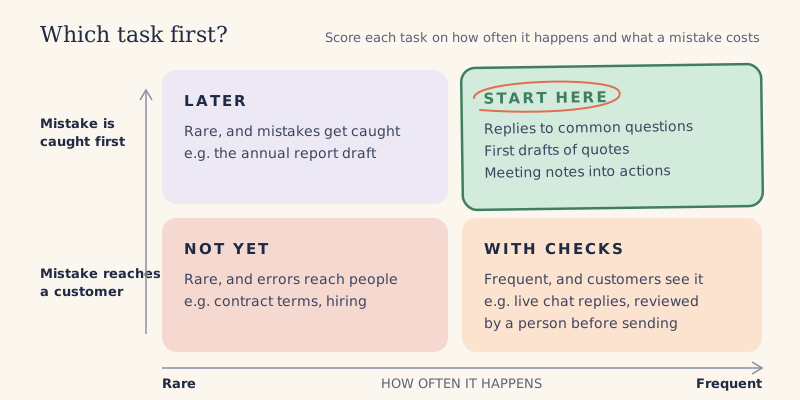
Score each task on three questions
- How often does it happen? Daily and weekly tasks beat quarterly ones, because you get more practice and more payback.
- How much time does it take? Add it up over a month, not per go. Ten minutes a day is more than three hours a month.
- How bad is a mistake? Would an error be caught before it reached a customer, and would it be embarrassing, expensive or harmful if it wasn't?
Your best first candidates are frequent, text-heavy and cheap to get wrong, because you or a colleague will check the result before it goes anywhere. Pick three. Then pick one of those to start with: the one you'd most like never to do by hand again.
What to leave for later
In month one, avoid anything where AI would act without a person checking first: sending emails automatically, making payments, giving regulated advice, or deciding who gets hired or who gets credit. None of these are off-limits forever, but they need testing, controls and sometimes legal advice, and they're the wrong place to learn.
Week 2 (Days 8 to 14): Try One Task With One Tool
Now choose a tool, and resist the urge to go shopping. You almost certainly have access to a capable assistant already: ChatGPT, Claude or Gemini on their own, Microsoft 365 Copilot if your business runs on Microsoft, or Gemini inside Google Workspace. For a first month, the differences between them matter far less than how well you brief them.
A paid plan mainly buys you higher usage limits, the more capable models and better data controls. Among U.S. small businesses that pay for AI, the Chamber report put median spending at $250 a month. In month one you should be spending well below that, and quite possibly nothing beyond a subscription you already have.
Brief it like a new hire, not a search engine
Most disappointing first experiences come from one-line requests. Treat the assistant like a capable new starter on their first day: quick, keen and knowing nothing about your business. A good brief covers four things.
- Context: who you are, who the customer is and what the task is for.
- An example: one of your best past versions, such as a quote that won the job or a reply a customer thanked you for.
- The rules: tone, length, things you never say or promise, and what to do when information is missing.
- The output: exactly what you want back, such as a draft email with a subject line or a table with three columns.
Examples matter more than most people expect. Studying 5,179 customer support agents, economists Erik Brynjolfsson, Danielle Li and Lindsey Raymond found that an AI assistant raised productivity by 14% on average, including a 34% improvement for novice and lower-skilled workers, with minimal impact on the most experienced. Their suggested explanation was that the assistant spread the practices of the best agents to everyone else. Your best past work does the same job: it shows the assistant what good looks like in your business.
Run it on real work, side by side
Use the assistant on the real task every time it comes up this week, aiming for at least five to ten goes. For the first few, keep doing your own version as well, so you can compare. Log the time and, more importantly, how much you had to change. A draft that saves 20 minutes but needs 15 minutes of fixing isn't a win yet. A draft that needs two small edits is.
When something comes back wrong, don't just fix it. Work out what the assistant didn't know, and add that instruction to your brief. By the end of the week you'll have a brief that works, and it will be the most valuable thing you make all month.
Week 3 (Days 15 to 21): Find Out Where It Breaks
By now you'll probably have a few results that impressed you. Week three is about finding the ones that shouldn't have.
AI is unevenly good, in ways that are hard to predict from the outside. In a pre-registered experiment with 758 Boston Consulting Group consultants, described in a 2023 working paper by researchers from Harvard Business School and other universities, consultants using GPT-4 on tasks within the AI's capabilities completed 12.2% more tasks, finished 25.1% faster and produced work rated more than 40% higher in quality. On a task chosen to sit just outside those capabilities, consultants using AI were 19 percentage points less likely to reach the correct answer than those working without it. The researchers called this a "jagged technological frontier": tasks that look equally hard can fall on either side of it.
The lesson for an owner is simple. You can't tell which side of the line your tasks sit on until you check, so this week, try to break it.
- Give it the awkward cases: the angry customer, the unusual request, the job with half the details missing.
- Check every fact it produces: figures, names, dates and prices. Assistants can state wrong things with complete confidence, and numbers are a common weak spot.
- Watch for promises: delivery dates, discounts or guarantees you would never offer.
- Hand your brief to a colleague and ask them to use it without your help. If it only works when you're driving, it isn't ready.
Decide: keep, tweak or drop
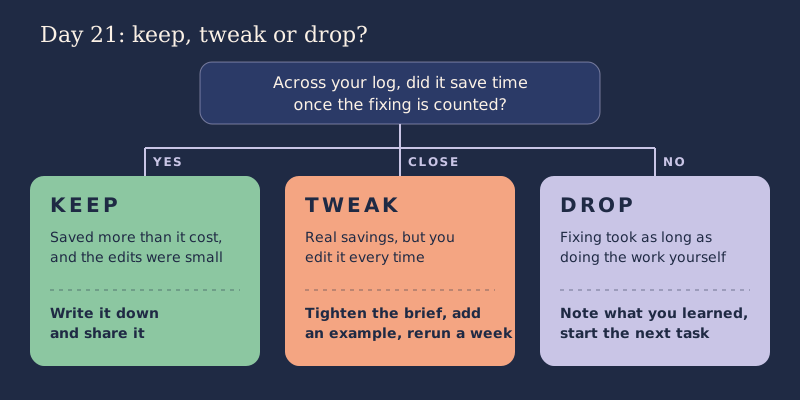
At the end of week three, look at your log and make a call. Keep the task if the time saved is real and the edits are small. Tweak it if it's close: tighten the brief, add examples or narrow the task. Drop it if you're spending as long fixing the output as you would have spent doing the work.
Dropping a task isn't failure. You've learned something specific about your business in three weeks, for the price of a subscription you may already have had. If you drop it, go back to your shortlist from week one and start the next candidate in week four.
Week 4 (Days 22 to 30): Make It a Habit and Choose What's Next
A task that works on day 21 can still be forgotten by day 45. Week four turns it into the way the work gets done.
Write it down
Put the brief, two or three good examples and the checks you do into a single document, saved where your team can find it. This is your first AI procedure. It means the result no longer depends on you remembering how you did it, and anyone in the team can pick it up.
Bring one or two people in
Show the team what you tried, including what went wrong. In our experience, people are far more open to a tool they've seen fail and get fixed than to one that's announced as the future. Ask them what they'd use it for, because staff usually know exactly where the repetitive work in their own jobs is. Be honest about the purpose, too. If the aim is to free up time for better work rather than to cut jobs, say so plainly.
Put a number on it
Take the hours saved per week from your log and multiply them by what an hour of that person's time is worth. If writing quotes went from four hours a week to two and a half, that's six hours a month back. For an owner, the more honest question is what you'll do with those six hours: follow up more leads, spend more time with customers, or simply stop working on Sunday evenings.
Choose the next step
With one task working, you have three sensible options for month two.
- Repeat the cycle on the next task from your shortlist. This is the right move for most businesses, and each round goes faster than the last.
- Upgrade if usage limits or data controls are holding you back. Our guide to budgeting for AI as a small business shows what different levels of spending get you.
- Build something custom only when a task is core to the business, high in volume and needs your own systems or data, such as answering customer questions from your product catalogue. At that point it's worth understanding how custom AI differs from ChatGPT before you spend.
Five Mistakes That Make Owners Feel Further Behind
- Buying the tool before choosing the task. A subscription without a job to do becomes one more unused login, and one more reason to feel behind.
- Starting with a strategy instead of a task. A 40-page AI strategy is easy to commission and hard to act on. One working task teaches you more than a roadmap does.
- Judging AI on a single try. One great demo or one bad answer tells you very little. Ten real attempts tell you a lot.
- Letting it send things unchecked. The AI mistakes that hurt are usually the ones a customer sees. Keep a person between the draft and the send button until you've tested properly.
- Doing it all yourself. If you're the only person who knows how the AI works, you've added a task to your week rather than removed one. Write it down and share it from the start.
What to Do If You Still Feel Behind on AI After 30 Days
Some owners finish the month with one task working and still feel behind, because the headlines haven't stopped. That's normal. The difference is that you're now judging AI on your own evidence rather than on other people's announcements, and you can tell a tool that would save you real hours from one that simply demos well.
If your next step involves connecting AI to your own systems or customer data, or letting customers see its output without a person checking, that's usually the point where outside help pays for itself. Whoever builds it, it's worth knowing how to test an AI system before launch.
Conclusion
Feeling behind on AI is mostly a reaction to noise. The quieter story in the government numbers is that most businesses are still early, and that the ones getting value got there by picking one task, testing it on real work and writing down what worked.
You don't need a strategy, a big budget or a technical team to start. You need two to three hours a week, one task from your own to-do list and the patience to check the results. Start the list on Monday. By the end of the month you won't be wondering whether you're behind; you'll know exactly where you stand and what to do next.
If you'd like a second opinion on which task to start with, or you're ready to go beyond off-the-shelf tools, talk to AI Native Agency.
Frequently Asked Questions
- Is it too late to start using AI in my business?
- No. At the last count, government surveys found about one in five US businesses, and one in five EU firms with 10 or more staff, using AI in their operations. Most businesses are still early, and the main advantage of starting now is the experience you build, not the software you buy.
- Which AI tool should a small business start with?
- Start with the general assistant you already have access to, such as ChatGPT, Claude, Gemini or the Copilot built into Microsoft 365. For a first project, how well you brief the tool matters far more than which one you choose. Switch or upgrade later if you hit usage limits or need stronger data controls.
- How much should a small business spend on AI in the first month?
- Very little, and often nothing beyond a subscription you already have. One or two paid seats are enough to test a task properly. For a reference point once you've found tasks worth paying for, the U.S. Chamber of Commerce found that small businesses paying for AI spent a median of $250 a month in 2026.
- Is it safe to put customer information into ChatGPT or other AI tools?
- It depends on the plan and its settings. Business and enterprise plans from the major providers generally offer stronger protections than free personal accounts, such as not training on your data by default. Until you've checked, keep customer personal data and confidential information out.
- What is the best first AI task for a small business?
- A task you do every week that involves writing or reading, where a mistake would be caught before it reached a customer. Common examples are drafting replies to frequent customer questions, first drafts of quotes and proposals, and turning meeting notes into action lists. Avoid anything that sends, pays or decides automatically until you've built some experience.
- Do I need to hire someone to start using AI?
- Not for the first steps. An owner or a team member can get one task working with off-the-shelf tools. Outside help becomes worthwhile when you want AI connected to your own systems or data, when customers will see its output without a person checking, or when the task is important enough that mistakes would be costly.