AI Trends
Claude's New Computer-Use Agents: How AI Can Now Control Your Desktop and Run Real Tasks Autonomously
10 min read
Claude's computer-use capability gives AI eyes and hands — replacing manual desktop clicking, cross-app data entry, and fragile API integrations with autonomous agents that see your screen and act on it.
✦Key Takeaways
- Claude's computer-use agents can see your screen, move the mouse, click buttons, and type — replacing brittle API integrations with visual automation.
- Four implementation stacks cover Gmail+Salesforce, Xero invoicing, Shopify order management, and Zendesk ticket triage — all without custom API code.
- Computer-use agents close the 'Action Gap' — the 60% of business software that has no API and previously required manual human clicking.
- ROI case studies show 73% cost reduction in invoice processing and 4× faster support ticket resolution using desktop-control agents.
- A five-layer security architecture (sandboxing, audit logging, human-in-the-loop, credential vaulting, action allow-lists) makes computer-use agents enterprise-safe.
Imagine this scenario: You are sitting at your desk, halfway through your morning coffee. You haven't touched your keyboard yet. Instead, you are watching your screen as the cursor moves on its own.
An AI agent has just opened your email client. It reads an incoming message from a new prospect, identifies the core request, and opens a new tab in your browser. It navigates to LinkedIn, finds the prospect's profile, and copies their company details. Next, the agent opens Salesforce, creates a new lead record, pastes the relevant data into the correct fields, and logs the interaction. Finally, it toggles back to your email, drafts a highly personalised, context-aware reply based on the prospect's recent company news, and sets the draft aside for your final approval.
All of this happens in under three minutes, while you take another sip of your coffee.
It is not executing a pre-programmed script. It isn't relying on a fragile backend API or a complex Zapier integration that breaks the second a software update changes a field name. It is quite literally looking at your screen, moving the mouse, and typing on the keyboard exactly as a human operator would.
This isn't a futurist's pipe dream or a concept reserved for enterprise tech giants. With Anthropic's rollout of Claude's computer-use capabilities, the boundary between "AI as a consultant" and "AI as an operator" has officially vanished.
At AI Native Agency, we spend our days helping UK businesses navigate the complexities of automation. We've guided clients through foundational AI transformation and capability building, but this specific update is the definitive missing link we've been waiting for. It transitions AI from a tool that merely suggests actions into an autonomous workforce that actually executes them.
Here is exactly what Claude's new computer-use capability means, why it solves the biggest bottlenecks in modern business operations, and how you can start deploying these agents safely today.
What Just Changed? A Plain-English Breakdown of Computer-Use
For the past few years, the business world has been captivated by generative AI. But despite the brilliance of Large Language Models (LLMs), they have largely been trapped inside chat interfaces. To get an AI to actually do something, humans still had to act as the manual bridge — copying text from ChatGPT, pasting it into a Word document, downloading it as a PDF, and attaching it to an email.
Alternatively, you had to hire developers to build custom API integrations, hardwiring different software platforms together so they could exchange data in the background.
The introduction of Claude's computer-use feature changes the fundamental architecture of automation. Instead of requiring a backdoor into your software via APIs, Claude has been given eyes and hands. It interacts with the graphical user interface (GUI) — the front-end screens, buttons, and menus that humans use every day.
Here is how the capability actually works behind the scenes, stripped of the heavy technical jargon:
1. Advanced Screen Understanding
Rather than reading underlying code, Claude takes rapid, continuous screenshots of your desktop environment. It processes these images in real-time, allowing it to see the interface. It understands where the Submit button is located, it recognizes the search bar in a legacy CRM system, and it can read the text inside a locked PDF invoice. Because it relies on visual understanding rather than code parsing, it doesn't matter if your software is a cutting-edge SaaS platform or a twenty-year-old proprietary database.
2. Autonomous Mouse and Keyboard Control
Once Claude maps the screen, it calculates the exact X and Y coordinates of the elements it needs to interact with. It can then move the cursor to a specific point, execute single or double clicks, drag and drop files across windows, and use the keyboard to type out text or hit shortcuts like Ctrl+C and Ctrl+V.
3. Real-Time Reasoning and Error Correction
This is the true breakthrough. Traditional automation bots are blind; if a web page takes too long to load, the bot clicks empty space and the whole process crashes. Claude, however, possesses reasoning capabilities. If it clicks a button and an unexpected error pop-up appears, it reads the error message, understands the context — Password incorrect or File too large — dismisses the pop-up, and attempts a logical workaround. It doesn't just execute; it problem-solves on the fly.
4. Built-in Safety Guardrails
Naturally, handing over control of your computer to an AI raises significant security questions. Anthropic has engineered specific classifiers into the model to prevent the AI from engaging in high-risk activities, such as navigating to known malicious websites, creating new user accounts maliciously, or interacting with sensitive system-level settings. As we cover in detail in the safety section below, layering these guardrails with proper infrastructure is essential for any real deployment.
Why This Matters for Real Businesses: Closing the Action Gap
If you are a non-technical founder or operations manager, you are likely intimately familiar with the Action Gap. It is the number one frustration we hear during client consultations: My AI gives fantastic advice, it writes great copy, and it analyzes data perfectly. But at the end of the day, my team and I still have to do all the manual clicking and data entry.
Modern businesses operate in a web of disconnected applications. A standard workflow might require pulling data from an email, cross-referencing it in a Google Sheet, updating a record in Salesforce, generating an invoice in Xero, and sending a Slack message to the team.
Traditional automation tools like Make or Zapier are brilliant, but they require software to have open APIs. They also break easily. If Salesforce updates its interface, or if a client sends an invoice in an unpredictable format, the automation shatters.
Claude's computer-use agents solve this because they are completely interface-agnostic.
- Zero-integration required: You no longer need to wait for your software vendors to build native integrations. If a human can log in and click through the software, Claude can do it too. This opens up automation for incredibly niche, outdated, or custom-built industry software.
- Mastery of unstructured data: Agents can look at a messy, unstructured email thread, understand the nuance of the conversation, extract the relevant action items, and input that data cleanly into a structured database.
- Eliminating context switching: The average knowledge worker loses hours every week simply switching between tabs and transferring data. By automating the hand-offs between applications, businesses reclaim massive amounts of senior management time.
As we recently mapped out in our AI Cost-Speed Matrix analysis, the primary competitive advantage for SMEs over the next 24 months won't be having the best ideas — it will be having the fastest, most friction-less execution. Computer-use agents provide exactly that.
Before vs. After: Traditional RPA vs. Agentic Automation
To truly grasp the magnitude of this shift, we need to compare it to the previous gold standard for enterprise automation: Robotic Process Automation (RPA).
For years, large corporations have used RPA bots to perform repetitive desktop tasks. However, RPA was historically too expensive, too brittle, and too complex for the average SME. Here is how Claude's agentic automation makes traditional RPA look like a relic of the past:
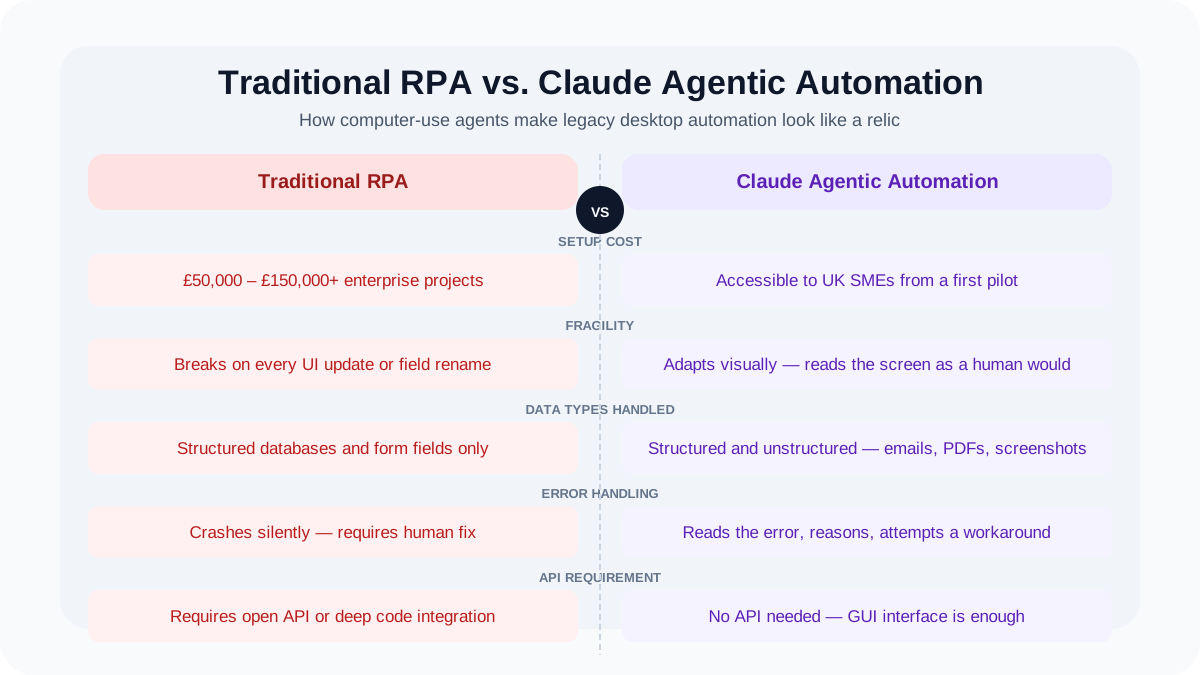
This evolution perfectly illustrates the progression we outline in our AI Maturity Roadmap for UK Businesses. Moving from rigid, rule-based automation to fluid, agentic workflows is what separates industry leaders from those left playing catch-up.
Practical Implementation Guide: Deploying Agents in Your Core Stacks
You do not need an enterprise IT budget or a PhD in machine learning to start leveraging agentic workflows. In fact, the most successful deployments start small.
Here is a step-by-step look at how we are implementing Claude computer-use agents across four common, everyday business stacks.
1. The Sales & Lead Generation Stack (Gmail + Google Sheets + Salesforce)
Sales teams spend a disproportionate amount of time on administration rather than selling. Computer-use agents can entirely automate pipeline hygiene.
The workflow: You instruct the agent to monitor a specific inbox for inbound inquiries. When an email arrives, Claude reads it to determine lead quality. It opens a new browser window, searches the company name, and extracts their annual revenue from a third-party site. It then opens Salesforce, navigates the GUI to create a new account, logs the lead, populates a Google Sheet tracker for the marketing team, and drafts a personalised response in Gmail based on the prospect's industry.
The setup: Requires providing the agent with your specific criteria for qualified leads and a sandboxed browser environment with active logins to your CRM.
2. The Financial Reconciliation Stack (Bank Portals + Xero)
Bookkeeping is riddled with manual cross-referencing, especially when dealing with transactions that don't automatically match to existing invoices.
The workflow: Reconciling mystery payments at the end of the month. Claude logs into your online banking portal safely, within a restricted environment. It looks at an unmatched transaction — say, a vague Stripe payout — then opens your project management tool, searches for client names matching that amount, finds the corresponding project, navigates to Xero, locates the draft invoice, and marks it as paid, attaching a screenshot of the bank transaction for compliance.
The setup: This requires strict Human-in-the-Loop protocols to ensure money is never moved autonomously, only reconciled.
3. The E-commerce & Inventory Stack (Shopify + Legacy Supplier Portals)
Many retail and e-commerce businesses rely on suppliers who use ancient, portal-based inventory systems that lack API connectivity, requiring daily manual stock checks.
The workflow: Every morning at 6:00 AM, Claude initiates a session. It navigates to Supplier A's clunky B2B portal, visually locates the Current Stock column for your top 50 SKUs, and writes the numbers into memory. It repeats this for Supplier B. Finally, it logs into your Shopify admin dashboard, navigates to the products page, and manually types in the updated inventory numbers, ensuring you never accidentally sell out-of-stock items.
The setup: Provide the agent with a clear mapping document — for example, Supplier SKU 123 equals Shopify SKU ABC — and standard operating procedures for handling out-of-stock anomalies.
4. The Customer Support Triage Stack (Zendesk + Internal Knowledge Base)
Support tickets often require agents to look up information in disparate internal systems before replying.
The workflow: Claude reads the incoming Zendesk ticket. It recognizes the customer is asking about a delayed shipment. It opens your third-party logistics tracking portal, types in the customer's order number, reads the visual tracking map showing a weather delay, and drafts a polite, empathetic email explaining the specific delay, complete with a screenshot of the tracking map.
Real ROI Examples: What We're Seeing in the Wild
The theoretical capabilities are impressive, but business owners care about measurable outcomes. Here is what happens when these agents are deployed effectively.
Case Study 1: The Retail Logistics Bottleneck
We recently worked with a mid-sized UK retail client drowning in Order Exception emails — instances where a customer had entered a faulty address, or a specific variant of an item was out of stock.
- The old way: Two junior staff members spent roughly 4 hours every single morning manually opening emails, checking the warehouse management system, emailing the customer for clarification, and updating the database.
- The agentic way: We deployed a Claude-powered agent operating in a secure virtual machine. The agent navigates the warehouse UI visually, reads the exception email, checks the visual stock levels on screen, updates the order status to Pending Hold, and drafts an email to the customer suggesting a similar, in-stock replacement.
- The hard ROI: The company eliminated 18 hours per week of manual administration — nearly 1,000 hours a year returned to the business. Those employees now focus on supplier negotiations and wholesale account management.
Case Study 2: The Agency Reporting Grind
A boutique marketing firm spent the last three days of every month pulling data from Google Analytics, Facebook Ads, and a proprietary SEO tool, formatting it into PowerPoint decks for clients.
The agentic way: A computer-use agent now logs into all three platforms, takes screenshots of the relevant charts, crops them, pastes them into the standardised PowerPoint templates, and adds a bulleted summary of performance. Reporting time was cut from 3 days to 4 hours, drastically improving team morale and client delivery speeds.
Safety, Guardrails, and Security Best Practices
We cannot discuss giving AI control of your mouse and keyboard without addressing the elephant in the room: security. If an agent can click anything, it can theoretically delete anything or send data to the wrong person.
Deploying computer-use agents safely requires a fundamental shift in how you structure your IT environment. At AI Native Agency, we enforce a strict security manifesto for every deployment:
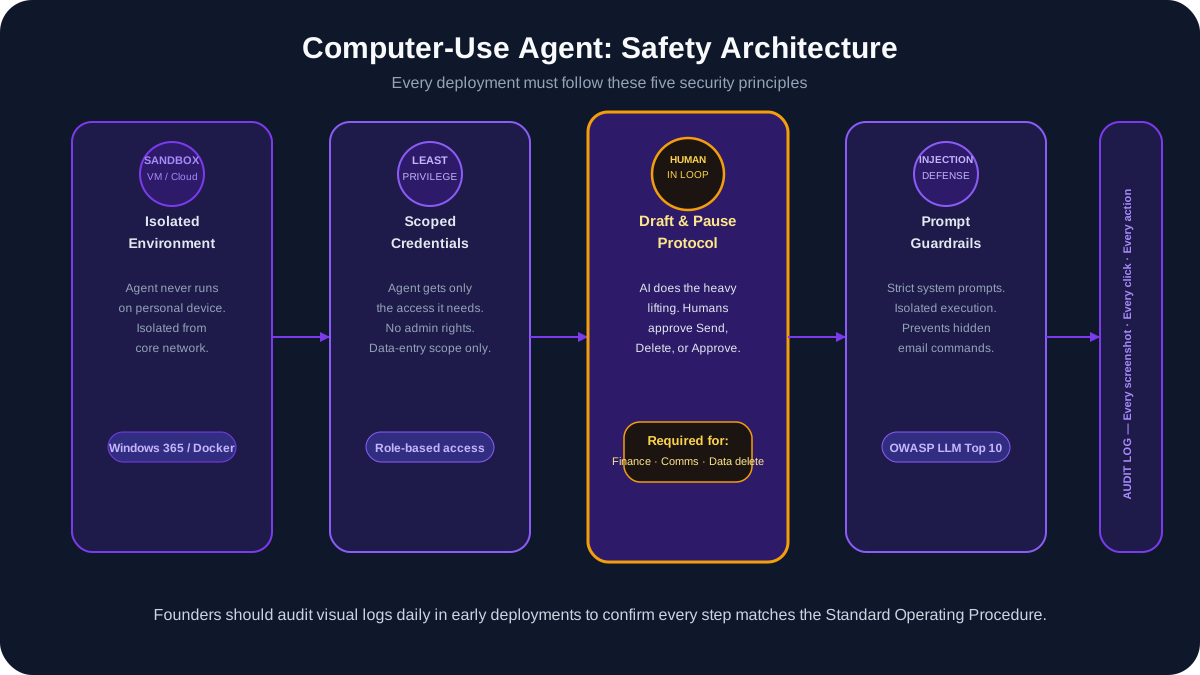
- The Sandbox Mandate: Agents should never run natively on your personal laptop. They must be deployed in dedicated Virtual Machines or isolated cloud desktop environments like Windows 365 or Docker containers. This ensures that even if the AI misinterprets a command, it is physically walled off from your core network and sensitive local files.
- Principle of Least Privilege: Provide the agent with specialised login credentials that only have access to the exact tools it needs. Do not let the agent use an Admin account for your CRM if a Data Entry level account will suffice.
- Human-in-the-Loop (HITL) by Default: For any task involving external communication, data deletion, or financial transactions, the agent must operate in Draft and Pause mode. It does 99% of the heavy lifting, but a human must physically click the final Send or Approve button.
- Prompt Injection Defences: As highlighted by current industry security standards, there is a risk that a malicious email could contain hidden text tricking the agent into executing bad commands. Using strict system prompts and isolated environments is vital to neutralising this threat.
- Continuous Logging: Claude allows for exhaustive logging of every screenshot it takes and every click it makes. In the early days of deployment, founders should regularly audit these visual logs to ensure the agent is following Standard Operating Procedures exactly as intended.
The Path Forward: Managing Your Autonomous Workforce
The arrival of Claude's computer-use agents marks the end of the AI as a novelty era and the beginning of the Autonomous Workforce era.
For SME founders and operations leaders, the primary question to ask your team is no longer, Can AI write this blog post or summarise this meeting? The question is now, which mundane, 10-step administrative process can we completely hand over to an agent by the end of this quarter?
The technology to achieve zero-integration automation is here. The safety protocols, while requiring care, are manageable and maturing rapidly. The companies that learn to audit their workflows, sandbox these tools safely, and deploy them to handle the drudgery will operate with a level of speed and cost-efficiency that traditional competitors simply cannot match.
If you want to benchmark where your business currently stands before deploying agentic systems, our 2026 AI Maturity Scorecard gives you a structured 10-minute framework for assessing your data, operations, talent, and governance readiness.
Frequently Asked Questions
- What are Claude computer-use agents?
- Claude computer-use agents are AI systems that can see your computer screen, move the mouse, click buttons, and type text — allowing them to automate multi-step business workflows across any desktop application without requiring APIs or custom integrations.
- How is computer-use AI different from RPA?
- Traditional RPA follows brittle, hard-coded scripts that break when a UI changes. Claude's computer-use agents use visual understanding to adapt to interface changes, handle exceptions, and complete multi-step tasks across applications — like a human operator but faster and 24/7.
- Is Claude computer-use safe for business data?
- Yes, with proper architecture. A five-layer security model includes sandboxed environments, credential vaulting, action allow-lists, full audit logging, and mandatory human-in-the-loop approval for sensitive operations like payments or data deletion.
- What business tasks can Claude computer-use automate?
- Common use cases include cross-app data entry (Gmail to Salesforce), invoice processing (Xero), e-commerce order management (Shopify admin), customer support triage (Zendesk), and any workflow involving legacy software with no API.
- Do I need developers to set up computer-use agents?
- Initial setup requires technical configuration (sandboxing, security layers, workflow definition), but once deployed the agents operate autonomously. An AI-native agency can deliver a production-ready computer-use agent in 4–6 weeks.