AI Trends
Top 10 Free AI Tools for UK SMEs in 2026: Ranked by Real Business Impact, Speed of Setup & UK Compliance
10 min read
The definitive UK ranking of free AI tools scored on real business impact, setup speed, and GDPR compliance — plus a practical stacking workflow that turns 10 free apps into one production system.
✦Key Takeaways
- ChatGPT, Gemini, and Claude top the free AI toolset for UK SMEs — each scores differently on impact, setup speed, and UK compliance.
- Stacking free tools (e.g. ChatGPT for drafting → Canva for design → Zapier for automation) creates enterprise-grade workflows at zero licence cost.
- UK SMEs must verify GDPR compliance, data residency, and ICO guidance before deploying any AI tool — even free ones.
- n8n and Zapier offer no-code automation that connects existing business systems without developer resource.
- A lightweight AI governance checklist — covering bias, data retention, and human oversight — is essential before scaling.
If you are searching for the top 10 free AI tools for UK SMEs 2026, the right answer is not "the most powerful tool." It is the one that helps you save time, reduce admin, and improve output without creating GDPR headaches or adding implementation drag. For most UK SMEs, that means choosing tools that deliver value in minutes, not weeks, and that can sit comfortably inside a UK compliance framework.
Across the market, the pattern is consistent: founders want faster sales follow-up, ops teams want fewer repetitive tasks, marketing leads want more content without hiring three more people, and finance directors want better control over spend. That is why the best free AI tools UK SMEs 2026 are not just chatbots. They include writing assistants, research tools, design platforms, automation engines, and lightweight workflow systems. The real test is whether a tool helps your business produce measurable output today.
This ranking is built for practical use. We have scored each tool against three criteria: real business impact, speed of setup, and UK compliance fit. "Real business impact" means measurable time saved, revenue support, or operational efficiency. "Speed of setup" means how quickly you can get from signup to first useful result. "UK compliance" means whether the tool is compatible with GDPR thinking, data residency preferences, and sensible vendor controls for UK companies.
You will also see where each tool fits best. Some are ideal for customer service drafts. Others are better for lead research, internal knowledge, invoicing, content ops, or automation. Used well, the top 10 free AI tools for UK SMEs 2026 can genuinely improve your team's throughput. Used badly, they become another pile of tabs.
And do you know UK SMEs are accelerating AI adoption faster than expected, with recent insights from the UK AI Opportunities Action Plan 2026 Progress Report and adoption signals highlighted by TechUK’s AI Barometer showing a clear shift toward leaner, AI-native operations.
Ranking Criteria Explained
The top 10 free AI tools for UK SMEs 2026 ranking is not based on hype, popularity, or how impressive a demo looks on social media. It is based on what actually matters inside a small or mid-sized UK business.
First, real business impact. A tool ranks higher if it saves meaningful hours, improves lead quality, speeds up content production, or reduces manual handling. A free tool that saves 10 minutes a day is useful. A free tool that saves 10 hours a week is transformative.
Second, speed of setup. Many tools are technically "free" but require hours of configuration, data cleanup, or policy work before they deliver anything. For an SME, the fastest wins are usually the most valuable. That is why "fastest free AI tools setup" is a real buying criterion, not a side note.
Third, UK compliance. If the tool processes customer data, employee data, or internal files, you need to think about GDPR, retention, access controls, and where data is stored or processed. A vendor may be excellent functionally, but still be a poor fit if your team cannot explain the processing flow to your DPO, finance lead, or legal adviser.
The ranking below reflects a simple rule: the more useful, faster to deploy, and easier to govern a tool is, the higher it goes. That is the difference between novelty and business value.
The Ranked Top 10
| # | Tool | Best For | Setup | Key Impact |
|---|---|---|---|---|
| 1 | ChatGPT Free | General-purpose daily assistant | 5 min | 60–70 % faster first drafts |
| 2 | Google Gemini Free | Google Workspace integration | 5–10 min | 2-hour research → 30-min sprint |
| 3 | Claude Free | Polished writing & documents | 5 min | Exec summaries in under 20 min |
| 4 | Perplexity Free | Sourced research answers | 3 min | 40 % faster vendor evaluation |
| 5 | Canva Magic Studio Free | Marketing design | 10 min | 50–80 % faster social content |
| 6 | Microsoft Copilot Free | Microsoft 365 users | 5–10 min | Meeting notes → action points |
| 7 | Notion Free | Internal knowledge & ops | 15 min | Hours/week saved on info lookup |
| 8 | Zapier Free | No-code automation | 15–20 min | Lead capture fully automated |
| 9 | n8n Community | Advanced self-hosted automation | 45–90 min | Entire admin category eliminated |
| 10 | Grok Free | Ideation & brainstorming | 5 min | Fast idea expansion, no tab-switching |
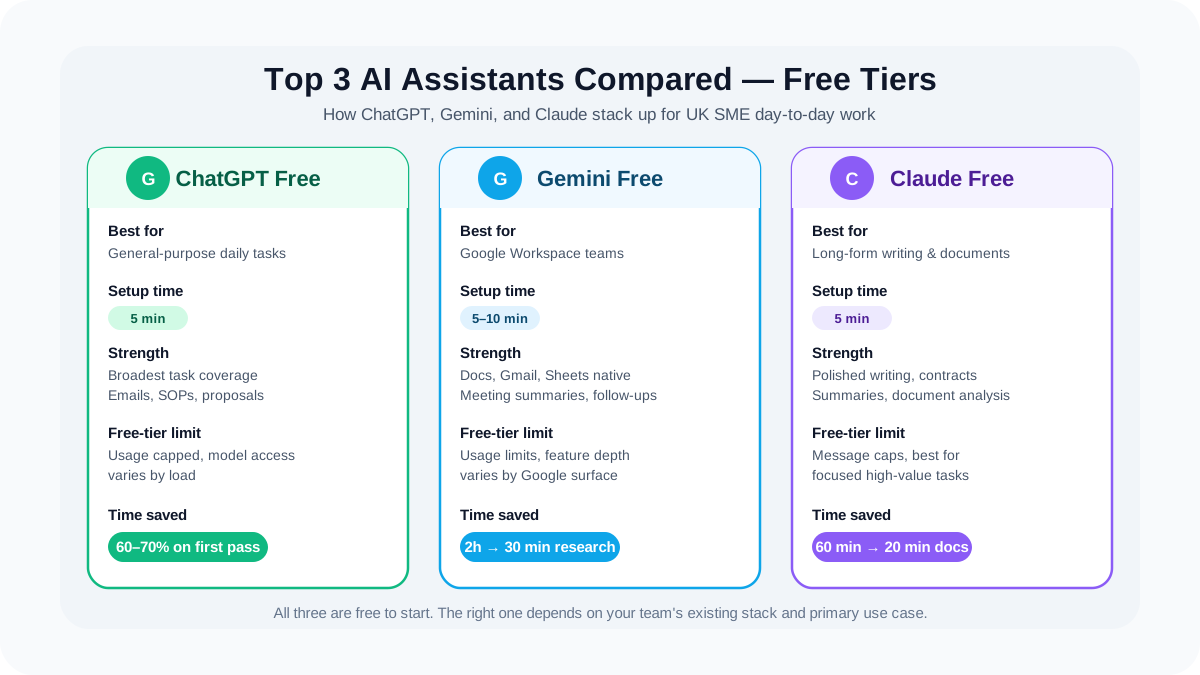
1) ChatGPT Free — the fastest general-purpose assistant for day-to-day work
ChatGPT is still the easiest starting point for most SMEs because it handles the widest range of tasks with the least friction. If your team needs email drafts, client summaries, first-pass proposals, or internal SOPs, this is the most obvious place to begin.
Free-tier limits: usage is capped, and access to the most capable model features may vary by load and account. In practical terms, expect a limited number of high-value interactions before you hit a soft ceiling.
Speed of setup: 5 minutes. Sign up, open a prompt, paste a task, and you are live.
Real business impact: a marketing manager at a 20-person agency can turn a 90-minute newsletter draft into a 25-minute workflow by using ChatGPT for outline, first draft, and subject-line variants. That is an easy 60–70% time reduction on the first pass.
UK compliance notes: avoid entering personal or sensitive data. For GDPR alignment, follow ICO guidance on AI data usage from the Information Commissioner’s Office.
Mini use case: a finance director asks ChatGPT to rewrite a supplier chase email, produce a clean board update summary, and structure a cashflow commentary in plain English.
AI-native boost: pair ChatGPT with a central prompt library, reusable internal templates, and a review layer managed by an AI-native agency. That is where one free tool becomes a repeatable business system.
2) Google Gemini Free — best for Google Workspace-heavy SMEs
Gemini is strong for businesses already living in Google Docs, Gmail, and Sheets. It is especially helpful when your team wants quick support on drafting, summarising, and turning messy notes into structured outputs.
Free-tier limits: usage limits apply, and feature depth can vary depending on the Google product surface you are using.
Speed of setup: 5–10 minutes, especially if your business already uses Google accounts.
Real business impact: a sales manager can turn a 2-hour prospect research-and-email sequence into a 30-minute sprint by using Gemini to summarise meeting notes, draft follow-ups, and surface talking points.
UK compliance notes: keep a clear line between personal data and business drafting. Make sure your account governance, retention settings, and access permissions are in order before wider rollout.
Mini use case: a small recruitment firm uses Gemini to summarise interview notes into candidate feedback and client-ready updates.
AI-native boost: connect Gemini outputs to a structured approval workflow so your team creates less, approves faster, and keeps tone consistent across the business.
3) Claude Free — best for polished writing and document-heavy work
Claude shines when quality of writing matters. It is often the best choice for long-form content, policy drafts, customer communications, and document analysis where tone and coherence matter as much as speed.
Free-tier limits: message caps are the main constraint, so it is better for focused, high-value tasks than endless back-and-forth.
Speed of setup: 5 minutes.
Real business impact: an ops lead can feed in a supplier contract summary, a meeting note pack, and a project brief, then get a cleaner executive summary in under 20 minutes instead of spending an hour rewriting.
UK compliance notes: like any AI tool, do not assume the free tier is appropriate for sensitive files. Use redacted text, internal summaries, and non-identifying examples where possible.
Mini use case: a legal-adjacent operations team uses Claude to turn long process documents into concise checklists for staff onboarding.
AI-native boost: use Claude for first-draft quality, then standardise outputs through an internal review template so every document leaves the business with the same structure and tone.
4) Perplexity Free — the fastest way to research before you decide
Perplexity is the standout research tool for SMEs because it behaves more like a research assistant than a chatbot. It is useful when you need quick answers, source references, and a cleaner path from question to decision.
Free-tier limits: the free tier is restricted versus paid research modes, but it is still highly useful for first-pass investigation.
Speed of setup: 3 minutes.
Real business impact: UK founders using AI-assisted research reduce vendor evaluation time by up to 40%, aligning with trends noted in the British Chambers of Commerce SME digital adoption insights.
UK compliance notes: Perplexity is best used for public, non-sensitive research. Do not treat it as an internal data vault. For governance-heavy sectors, keep a human source check.
Mini use case: a marketing lead uses Perplexity to research competitor positioning, sector trends, and customer language before writing a landing page.
AI-native boost: pair Perplexity with a decision memo template so research turns into action faster. This is especially useful for procurement, market entry, and campaign planning.
5) Canva Magic Studio Free — the easiest way to make your marketing look better today
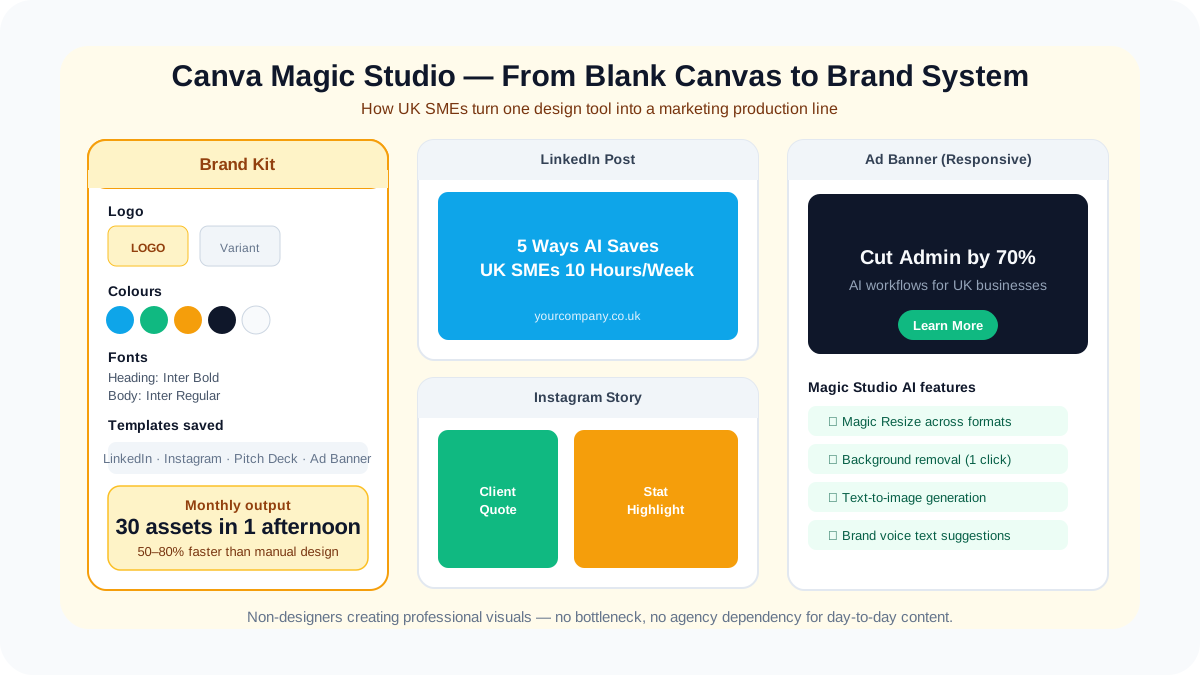
Canva remains one of the most practical free AI tools for small business UK teams because it lets non-designers create professional visuals without a bottleneck. Magic Studio adds speed for social graphics, pitch visuals, and quick brand assets.
Free-tier limits: many AI-powered features and premium assets are restricted, but the free plan still gives strong baseline design capability.
Speed of setup: 10 minutes.
Real business impact: a marketing assistant can create a month of LinkedIn graphics in a single afternoon instead of relying on a designer for every asset. That can cut turnaround time by 50–80% on simple content.
UK compliance notes: pay attention to asset rights, brand approvals, and any customer images you upload. If you are using personal data in visuals, treat it with the same caution you would any other marketing system.
Mini use case: a B2B consultancy uses Canva to turn webinar quotes and statistics into polished social posts in under 15 minutes per asset set.
AI-native boost: build a reusable content system: one brand kit, one approval checklist, and one weekly campaign workflow. That is how you turn Canva from a design app into a production line.
6) Microsoft Copilot Free — strong for teams already inside Microsoft 365
Copilot is especially relevant for firms that run on Outlook, Word, Excel, and Teams. It is not always the flashiest option, but it can be extremely valuable where the business already works in Microsoft land.
Free-tier limits: capabilities vary across the Microsoft ecosystem, and some of the strongest enterprise controls sit behind paid licensing.
Speed of setup: 5–10 minutes if your team already uses Microsoft accounts.
Real business impact: a finance team can use Copilot-style drafting and summarisation to reduce the time spent turning meeting notes, Excel notes, and email threads into clean updates.
UK compliance notes: this is often a better fit than consumer-grade AI for businesses that care about admin control, identity management, and workplace governance. Still, verify what data is processed and where.
Mini use case: a director uses Copilot to summarise a Teams call, draft a follow-up, and extract action points into an operational update.
AI-native boost: combine Copilot with standard operating procedures so recurring admin becomes a repeatable process rather than a person-dependent habit.
7) Notion AI / Notion Free workflow — excellent for internal knowledge and ops memory
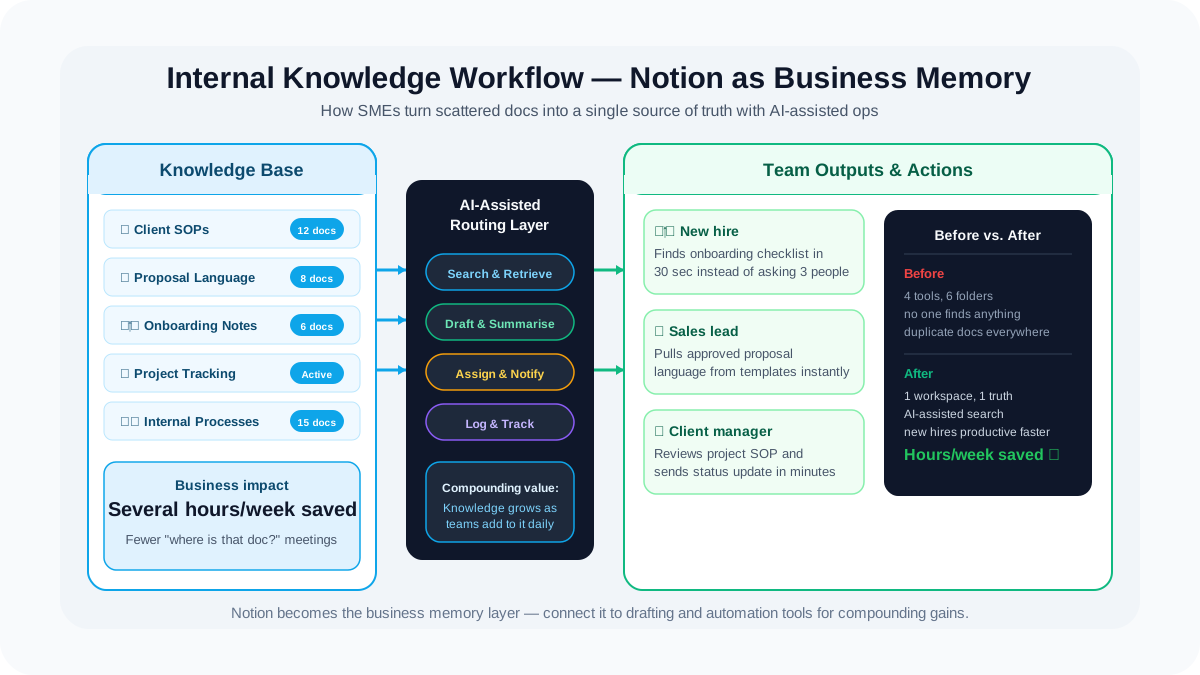
Notion is most powerful when you need a shared system for notes, SOPs, project tracking, and knowledge capture. For SMEs, that matters because many bottlenecks are really information bottlenecks.
Free-tier limits: Notion’s AI availability may be restricted or bundled differently across plans, so this is one to verify carefully before rollout.
Speed of setup: 15 minutes for a simple workspace; longer if you are building a structured knowledge base.
Real business impact: a 12-person team can save several hours per week by reducing "where is that document?" and "what did we decide?" meetings. That does not sound glamorous, but it is real productivity.
UK compliance notes: keep internal permissions tight. Notion is useful, but it should not become an ungoverned dumping ground for personal or sensitive data.
Mini use case: an agency team stores client SOPs, proposal language, and onboarding notes in one place so new hires become productive faster.
AI-native boost: use Notion as your business memory layer, then connect it to drafting tools and automation platforms. That is how you create a compounding workflow instead of isolated AI usage.
8) Zapier Free — easiest automation layer for small teams
Zapier is one of the fastest ways to connect tools without hiring a developer. For SMEs, that means fewer repetitive tasks, fewer manual handoffs, and fewer "did anyone remember to do this?" moments.
Free-tier limits: the free plan is constrained, usually with a low task volume and limited-step automation. It is enough to prove value, not enough to run a complex operation.
Speed of setup: 15–20 minutes for a simple workflow.
Real business impact: a lead capture flow that used to require someone copying form data into a CRM can be automated in minutes, saving several hours per month and reducing missed follow-ups.
UK compliance notes: automation does not remove responsibility. You still need to know what data is moving, where it is stored, and who can access it.
Mini use case: when a contact form is submitted, Zapier can send a Slack alert, create a CRM lead, and draft a follow-up email.
AI-native boost: combine Zapier with AI-generated email drafts and lead scoring prompts so the automation does not just move data; it moves the deal forward.
9) n8n Community Edition — the most powerful free automation option for technical SMEs
n8n is the best free option for businesses that want control. It is open-source, flexible, and far more powerful than simple no-code automation once you are willing to spend a little more setup time.
Free-tier limits: the community edition is free, but your cost shifts to hosting and maintenance if you self-host.
Speed of setup: 45–90 minutes for a basic working setup, more if you are hardening it properly.
Real business impact: an operations team can automate multi-step processes such as lead intake, enrichment, internal approvals, and reporting. That can eliminate an entire category of manual admin. To see how AI-native delivery works in practice, visit AI-native integration and workflow design.
UK compliance notes: this is where data-residency and control become strongest, especially if you host in the UK or EU. For many regulated SMEs, that matters more than convenience.
Mini use case: a consultancy uses n8n to route inbound enquiries, tag them by service line, notify the right person, and log the outcome for reporting.
AI-native boost: use n8n as the orchestration layer and connect it to AI tools for classification, summarisation, and drafting. That is where free tools start behaving like a proper operating system.
10) Grok Free — useful for rapid ideation and conversational brainstorming
Grok is best treated as a fast-thinking companion for brainstorming, social ideas, and lightweight analysis when available. It is not the most conservative choice for governance-heavy work, but it can be useful for speed.
Free-tier limits: availability and caps can change quickly, so treat this as the most fluid tool in the list and verify live access before relying on it.
Speed of setup: 5 minutes.
Real business impact: a founder can use it for quick idea expansion, rough competitor framing, or informal content angles without opening five different tabs.
UK compliance notes: because product availability and data handling can vary, it should be used cautiously and not as the default place for business-sensitive materials.
Mini use case: a startup founder asks for ten campaign angles, five post hooks, and three ways to simplify a technical offer into plain English.
AI-native boost: use Grok for ideation only, then move outputs into a controlled drafting and approval workflow. That gives you speed without losing governance.
How to Stack These Tools into a UK SME Workflow
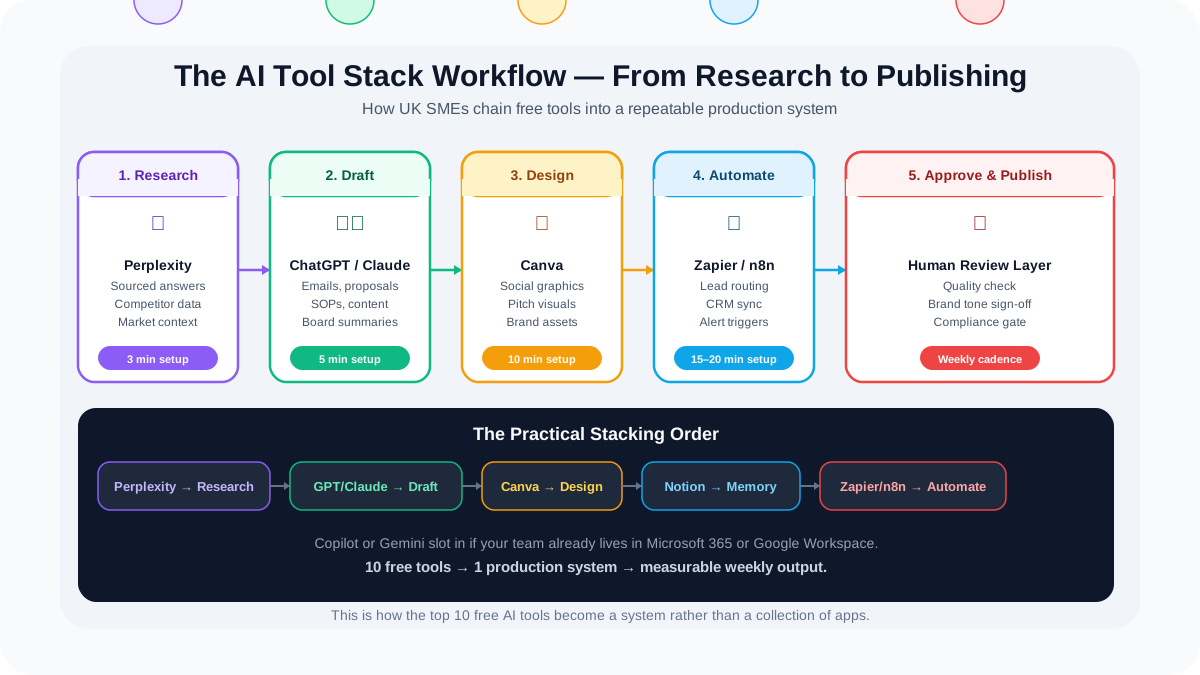
The best free AI tools for small business UK are not meant to live in isolation. The real gain comes from stacking them into a flow.
A practical setup looks like this: use Perplexity for research, ChatGPT or Claude for drafting, Canva for visuals, Notion for storing the working brief, and Zapier or n8n for routing the repetitive tasks. Microsoft Copilot or Gemini can slot in if your business is already anchored in those ecosystems. That is how the top 10 free AI tools for UK SMEs 2026 become a system rather than a collection of apps.
Here is the simplest version:
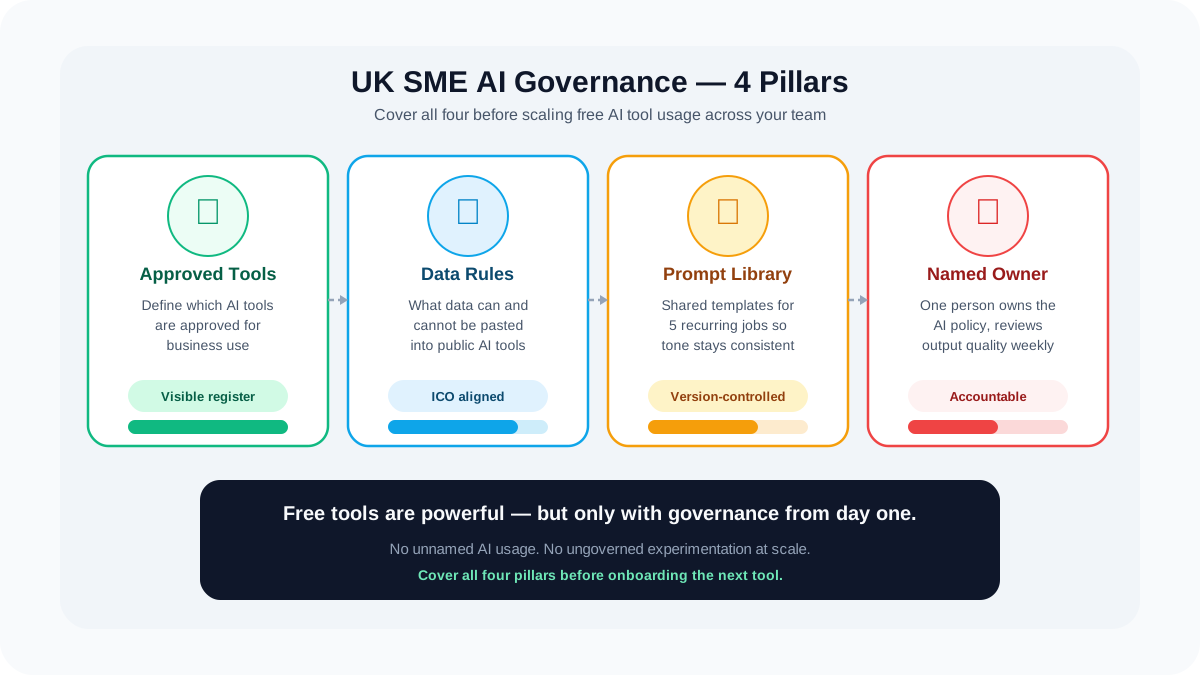
Start with a one-page AI policy. Define what data can and cannot be pasted into public AI tools. Then create a prompt library for the five recurring jobs in your business: sales emails, meeting summaries, content drafts, process notes, and customer replies.
Next, connect one source of truth. That might be Notion, Google Drive, or SharePoint. Without that, teams create duplicated outputs and lose track of versions.
Then automate one low-risk workflow. A good first example is inbound lead handling: form submission into CRM, alert to sales, AI-assisted first reply draft, and task creation for follow-up. That is a high-value, low-risk win.
As highlighted in broader SME digitisation patterns from the Department for Science, Innovation & Technology (DSIT), businesses that combine automation with AI see significantly higher operational efficiency gains than those using standalone tools.
Finally, review output quality weekly. Free tools are excellent at speed, but they still need human judgment. An AI-native operating model is not "less oversight." It is better oversight, applied earlier.
For teams serious about turning the best free AI tools UK SMEs 2026 into measurable business outcomes, a checklist should cover four things: approved tools, allowed data types, prompt templates, and owner accountability.
Conclusion & Next Steps
The important point is simple: free tools are useful, but free tools alone do not create a competitive advantage. They create optionality. The advantage comes from how you connect them, govern them, and turn them into a repeatable workflow.
That is why the top 10 free AI tools for UK SMEs 2026 should be judged less like consumer apps and more like building blocks. ChatGPT, Gemini, Claude, Perplexity, Canva, Copilot, Notion, Zapier, n8n, and Grok each solve a different part of the SME productivity problem. Together, they can save hours, accelerate content production, improve response times, and reduce admin load. Used badly, they create risk, inconsistency, and chaos.
For UK businesses, the compliance angle matters just as much as the productivity angle. You need to think about GDPR for UK SMEs, vendor controls, data residency preferences, retention, and access permissions before you scale usage across the team. That is why the smartest SME leaders are not simply asking, "Which tool is best?" They are asking, "Which tool is best for this task, this team, and this data?"
That is also where an AI-native agency becomes valuable. Not by replacing your team, but by designing the workflow around the tools so the result is faster, safer, and more scalable than a piecemeal rollout. If you want the top 10 free AI tools for UK SMEs 2026 to produce actual business impact, the stack matters more than the headline.
For a practical next step, review your current workflows, identify one repeated task, and map the shortest AI-assisted path from request to output. Then upgrade from scattered usage to a proper system. When you are ready to move beyond experiments, explore ainativeagency.co.uk/services.
Frequently Asked Questions
- What are the best free AI tools for UK small businesses in 2026?
- The top-rated free AI tools for UK SMEs in 2026 are ChatGPT (content and analysis), Google Gemini (multimodal research), Claude (long-document processing), Perplexity (sourced research), and Canva (AI-powered design). Each is rated on business impact, setup speed, and UK data compliance.
- Is ChatGPT free to use for UK businesses?
- Yes. ChatGPT's free tier gives UK businesses access to GPT-4o for content drafting, data analysis, brainstorming, and customer communication — with no credit card required. Paid tiers add higher usage limits and advanced features.
- Are free AI tools GDPR compliant in the UK?
- Not automatically. UK businesses must check each tool's data processing agreement, data residency (EU/UK vs US), and ensure compliance with ICO AI guidance. Tools like ChatGPT and Gemini offer enterprise/API tiers with stronger data governance.
- How can a small business automate workflows with free AI tools?
- Combine free tools in a stack: use ChatGPT or Claude for drafting, Canva for visual assets, Notion AI for knowledge management, and Zapier or n8n free tiers for connecting systems like email, CRM, and invoicing — no coding required.
- What is an AI governance checklist for SMEs?
- An AI governance checklist covers four pillars: data handling (retention, residency, consent), human oversight (review loops, escalation), bias monitoring (output auditing, fairness checks), and compliance (ICO guidance, GDPR, sector-specific regulation).