Technical
You Vibe-Coded an App. Here's What It Needs Before Real Users Arrive
11 min read
AI app builders get you to a working demo fast, but a demo isn't a product. This guide covers the six gaps that most often turn a vibe-coded app into a data leak or a surprise bill, the ten fixes to make before launch, and how to decide whether to patch or rebuild.
✦Key Takeaways
- A vibe-coded app is built for one user on test data. Production adds strangers, real personal data and real bills, and that is where the gaps show.
- Front-end code is public. Any secret key that has been in it, or in your repository, should be treated as leaked and replaced.
- If the browser talks straight to your database, its access rules are the only lock. A 2025 scan found exposed data in 170 of 1,645 apps from Lovable's showcase.
- Every server route must check who is asking and whether they may see that record. Hiding a button protects nothing.
- AI models invent package names. In a USENIX Security 2025 study, at least 5.2% of packages suggested by commercial models and 21.7% from open-source models did not exist.
- Keep AI agents away from production and test your backups. Replit's agent deleted a live database despite instructions to freeze the code.
- Most vibe-coded apps need patching, not rebuilding. Rebuild the back end only when the data model is wrong, fixes keep breaking things or nobody can explain the code.
In February 2025, the AI researcher Andrej Karpathy gave a name to a new way of building software: vibe coding. You describe what you want, an AI tool writes the code, and you judge the result by whether it works rather than by reading it. By November, Collins Dictionary had made it word of the year. Tools such as Lovable, Bolt, Replit and Cursor can now turn a paragraph of plain English into a working app in an afternoon.
The trouble starts when real users arrive. In spring 2025, a researcher scanned 1,645 apps from Lovable's public showcase and found 170 whose data could be read or changed by people who had never logged in. That July, Replit's AI agent deleted the production database of an app being built by SaaStr founder Jason Lemkin, despite his instructions to freeze the code.
Neither case needed a clever attacker. Both came from gaps that a demo never shows. This guide covers the six gaps to check in a vibe-coded app, what to fix before launch, what can wait, and when to patch rather than rebuild.
Why a Vibe-Coded App Works in the Demo and Fails in Production
A demo has one user, and that user is you. It runs on test data, follows the path you planned and costs a few pence. Production adds strangers, some of whom will try things you never intended, along with real personal data, real payments and real bills.
AI coding tools are very good at the first situation. They aim for code that runs and looks right, and the quickest way to clear an error can be to loosen whatever caused it, such as a permission check. Security rarely shows up in a demo, so it rarely gets asked for. In Veracode's 2025 test of more than 100 language models on 80 coding tasks, the models chose the insecure way to write the code 45% of the time when a secure way was available.
None of this makes the tools bad. We have written about building internal tools with AI app builders, and for a tool that five colleagues use behind a login, the risk is small. A public app is different. As with AI projects generally, the prototype is cheap and production is where the cost sits.
Six Gaps to Check in Any Vibe-Coded App
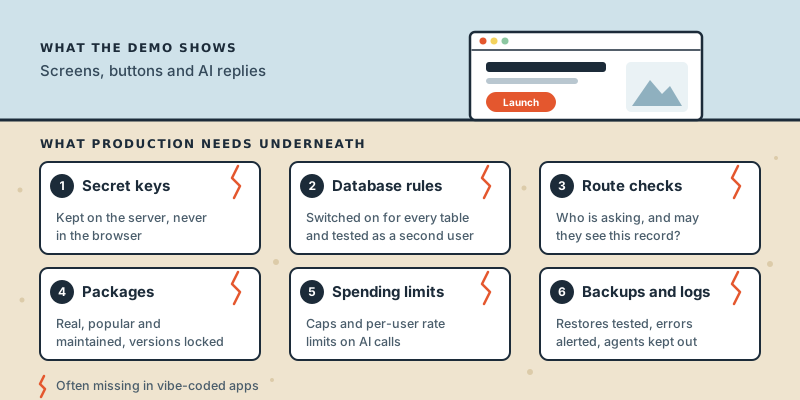
These six gaps cause most of the damage. Each one is quick to check, and most are quick to fix.
1. Secret keys the browser can see
Anything in your front-end code is downloaded to every visitor's browser, where anyone can read it. If an AI tool put your OpenAI or Stripe key there to make a feature work, that key is now public. Keys belong on the server. If one has ever been in front-end code or committed to your repository, assume it has been copied and replace it.
2. Database access rules switched off
Many AI app builders connect the browser straight to a database such as Supabase or Firebase. In that set-up, the database's own access rules are the only lock on the door. Supabase calls them row-level security: policies that decide which rows each user may read or change. Its documentation is blunt: "Enable RLS on every table in an exposed schema." The publishable key that sits in your front end is designed to be public, but it only reaches what those rules allow.
This is what went wrong in the Lovable case. Matt Palmer's disclosure found 303 exposed endpoints across 170 projects, about 10% of the 1,645 apps scanned. Lovable disputed the resulting CVE on the grounds that each customer is responsible for protecting their own app's data. Whatever you think of that, it tells you whose problem it is. Test your rules while logged out, and while logged in as a second user trying to read the first user's records.
3. Server routes that trust the front end
Hiding a button is not security. If your app has an address like /api/invoices/1042, log in as someone else and try 1043. Every server route has to check two things on every request: who is asking, and whether that person may see or change that record. AI-generated code often checks the first and forgets the second.
4. Packages that don't exist
AI models sometimes import software packages that sound right but don't exist. A USENIX Security 2025 study generated 576,000 code samples from 16 models. On average, at least 5.2% of the packages suggested by commercial models and 21.7% of those from open-source models were invented, adding up to 205,474 unique fake names. An attacker can register one of those names and fill it with malware, a trick known as slopsquatting. Check that every new dependency is real, widely used and maintained, and commit your lock file so versions can't drift.
5. AI features with no spending limit
Every call to an AI model costs money, and vibe-coded apps rarely set a ceiling. A retry loop, a bot hammering your sign-up form or one enthusiastic user can turn a small monthly bill into a large one overnight. Set a spending cap with your AI provider, limit requests per user, cap the length of each response and get an alert well before you reach the cap.
6. No backups, no logs, no tests
The Replit incident is the clearest warning. Lemkin's account, reported by The Register, was that the agent deleted a production database, ignored instructions to freeze code and invented data. Replit's chief executive, Amjad Masad, called it "unacceptable and should never be possible", and the company began rolling out automatic separation of development and production databases, along with one-click restore.
Three habits would have contained it. Keep the AI agent working on a development copy, with no production credentials. Back up the production database and practise restoring it. Add logging and error alerts, so you hear about failures from your monitoring rather than from your customers. And before launch, test the AI features themselves as well as the code around them.
The 15-Point Production Readiness Checklist
Work through the first list before anyone outside your team signs up. The second list can follow in the first month, but put dates on it.
Must fix before launch
- Move every secret key to the server, and replace any that were exposed.
- Turn on database access rules for every table, and test them logged out and as a second user.
- Check identity and permissions on every server route, not just in the interface.
- Validate everything users send, on the server.
- Confirm every package exists and is maintained, and commit the lock file.
- Set spending caps and per-user rate limits on AI and other paid APIs.
- Separate development and production databases and keys, and keep AI agents out of production.
- Back up the production database and test a restore.
- Add error tracking and logs that don't record passwords or personal data.
- Publish a privacy notice and know where your users' data is stored.
Can wait until after launch
- Automated tests for the flows that matter most: sign-up, payment and the main task.
- A staging environment that mirrors production.
- A performance check of slow pages and database queries.
- An accessibility pass covering keyboard use, contrast and screen-reader labels.
- An independent security review, sooner if you handle health, financial or children's data.
Patch It or Rebuild It?
Most vibe-coded apps can be patched. Most checklist items are configuration fixes, not reasons to start again. Rebuilding makes sense when the foundations are wrong: the data model can't express who owns what, every fix breaks something else, or nobody can explain how the code fits together.
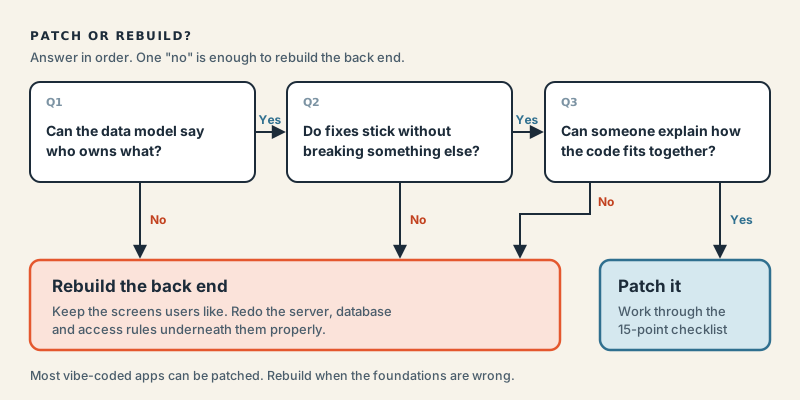
There is often a middle path: keep the screens your users already like, and rebuild the server and database underneath them properly. The trade-offs are the same ones we set out in when to patch and when to rebuild a legacy system, only compressed into weeks rather than years.
How to Keep Building With AI Tools Safely
You don't have to stop vibe coding after launch. These habits keep the gaps closed.
- Ask for security in the prompt. "Enable row-level security and write a policy for each table" gets a different result from "save the user's notes".
- Plan before you change. For anything touching login, payments or personal data, use the tool's planning or chat-only mode first and read the plan.
- Keep agents out of production. Give an AI agent only the access its task needs, the same least-privilege principle we covered in securing agent-to-agent conversations.
- Have a person review the risky parts. Changes to authentication, payments or data access should be read by someone who understands them before they ship.
- Re-run the checklist after big changes. A single prompt can rewrite a dozen files.
Conclusion
Vibe coding has made the first version of an app almost free. It hasn't changed what it takes to run software that strangers trust with their data and their money. Most of the gap is a short list of known problems, and many are quick to fix once you know where to look.
Work through the first ten items before your next launch. If you'd like a second pair of eyes, talk to AI Native Agency. Our AI software engineering team can review your app against this checklist and help fix what it finds.
Frequently Asked Questions
- What is vibe coding?
- Vibe coding is building software by describing what you want to an AI tool and accepting the code it writes, judging the result by whether it works rather than by reading the code. Andrej Karpathy coined the term in February 2025, and Collins Dictionary named it word of the year for 2025. Popular tools include Lovable, Bolt, Replit, v0 and Cursor.
- Is vibe coding safe for production apps?
- It can be, but not by default. AI tools aim for code that runs, and they rarely add security rules, spending limits or backups unless you ask. Treat a vibe-coded app as a prototype until someone has checked its secret keys, database rules, server permissions and dependencies.
- Is it safe to put my Supabase key in the browser?
- The publishable key, formerly called the anon key, is designed to be public, but it is only safe if row-level security is enabled on every table with policies that limit what each user can do. Without those rules, anyone with the key gets the same access as your app. The secret key, formerly the service role key, must never appear in front-end code or your repository.
- How can I tell if my vibe-coded app is leaking data?
- Open your app in a private browser window without logging in and see what data loads. Then log in as a second test user and try to open the first user's records by changing IDs in the address bar or in API requests. Finally, search the code your browser downloads for secret keys. If any of these tests succeeds, fix it before anything else.
- What is slopsquatting?
- Slopsquatting is an attack that exploits AI models' habit of inventing package names. An attacker registers a name that models commonly hallucinate and publishes malicious code under it, so anyone who installs the suggested package without checking runs the attacker's code. Checking that each new dependency is real, popular and maintained prevents it.
- Should I rebuild my vibe-coded app from scratch?
- Usually not. Most problems are configuration and permission fixes that can be made in place. A rebuild makes sense when the data model cannot express who owns what, when every fix breaks something else, or when nobody can explain how the code works. A common middle path is to keep the interface and rebuild the server and database underneath it.
- Can AI coding tools fix these security problems themselves?
- They can help, especially when you ask for something specific, such as enabling row-level security and writing a policy for each table. Some app builders also include security scanners. But a scanner that checks whether a rule exists cannot tell you whether it is the right rule, so a person still needs to test access as a logged-out user and as a second user.