A chatbot is only as reliable as the documents it searches. This guide shows how stale pages, conflicting versions and unanswered questions turn into confident wrong answers, then gives a seven-step knowledge base audit to run before you build and a checklist for launch day.
✦Key Takeaways
- A RAG chatbot answers from the few passages its search returns. It can't reliably tell a current policy from an old one, so your documents have to make that obvious.
- Most wrong answers come from five document problems: old files, conflicting versions, unanswered questions, passages that lose their meaning out of context and files shared too widely.
- Gaps are the riskiest. Researchers found that when a question relates to your documents but they don't answer it, a chatbot can be fooled into answering anyway.
- Audit from real customer questions, not from your file shares. Map your top 50 to 100 questions to the one current document that answers each.
- Write for retrieval: one topic per page, a heading that says what it covers, and dates, scope and exceptions in the text itself.
- An internal assistant shows staff whatever their permissions allow. Fix oversharing before you connect it to SharePoint or Google Drive.
In April 2025, developers using the AI coding tool Cursor kept getting logged out when they used it on more than one computer. Those who emailed support were told this was expected behaviour under a new login policy. Reports say some cancelled their subscriptions. The policy did not exist: the reply had come from an AI support bot, and it had made the rule up.
Cursor's co-founder Michael Truell apologised on Reddit. "We have no such policy," he wrote, calling the reply "an incorrect response from a front-line AI support bot". The logouts turned out to be a bug, since fixed, and the episode is now incident 1039 in the AI Incident Database.
We don't know how Cursor's bot was built, but the failure has a familiar shape: a reasonable question with no written answer, and a bot that answered anyway. Most businesses planning a chatbot spend their time choosing the model. The wrong answers usually start in the chatbot knowledge base, the documents the bot reads from. This guide covers how a chatbot uses those documents, the five problems behind most wrong answers, a seven-step audit to run before you build and how to keep the documents clean after launch.
How a Chatbot Uses Your Knowledge Base
Most business chatbots use a method called retrieval-augmented generation, or RAG. When a question arrives, the system searches your documents, picks out a handful of passages that look relevant and asks a language model to write an answer from them. We explained the set-up in our guide to how custom AI learns your business.
Two things follow. The model sees only those few passages, not your whole library, so its answer can only be as good as what the search returned. And it has no reliable way to tell which passage is current, which is official and which is a draft someone forgot to delete. If your 2022 and 2026 price lists both match the question, it may quote either.
Researchers at Deakin University reached the same conclusion from three RAG projects in research, education and biomedicine. Their paper on seven ways these systems fail puts missing content first: questions the documents cannot answer. Ideally the system replies with something like "Sorry, I don't know". But for questions that relate to the content without being answered by it, the authors found the system "could be fooled into giving a response".
The architecture choices we compared in advanced RAG vs long context windows change how much text the model can read at once. None of them makes the text right.
Five Knowledge Base Problems Behind Wrong Chatbot Answers
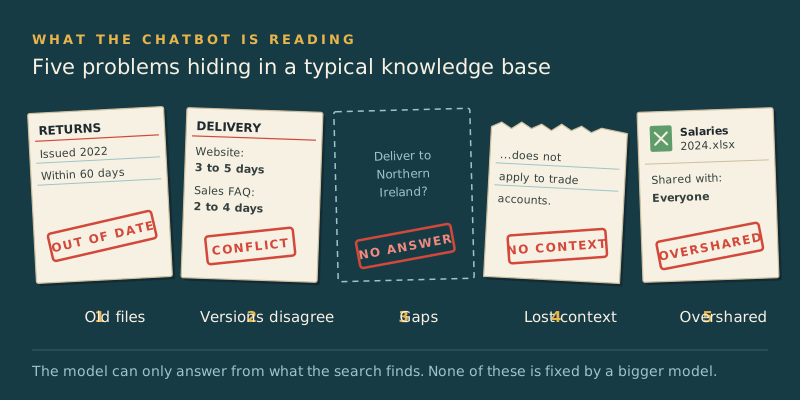
In our experience, most bad chatbot answers trace back to one of these five problems. A better model fixes none of them.
1. Old documents nobody removed
Shared drives keep everything: the returns policy from before you changed couriers, last year's price list, a proposal template with old terms. Your staff know to ignore them. A chatbot doesn't. If an old document happens to match the wording of a question better than the new one, the old one wins the search.
2. Several versions of the truth
Ask three teams where the delivery policy lives and you may get three answers: the website page, a sales FAQ and the staff handbook. If they disagree even slightly, the chatbot quotes whichever one ranks highest for that question, so two customers asking in different words can get different answers. You are responsible for whichever one it picks. A Canadian tribunal held Air Canada liable when its chatbot's answer on bereavement fares didn't match the airline's own policy, a case we covered in our guide to testing an AI system before launch.
3. Questions nobody has answered in writing
Many of the questions customers ask are answered only in someone's head. Do you deliver to Northern Ireland? Can a discount code be used on sale items? What happens if the installer cancels? These gaps are where chatbots invent policy. Write down what you don't do as well as what you do, because a bot that can't find "custom orders can't be refunded" may tell a customer they can.
4. Passages that only make sense in context
Before searching, the system cuts documents into short passages called chunks. A line such as "this doesn't apply to trade accounts" or "see the table above" loses its meaning once it's separated from its heading. When Anthropic published its work on contextual retrieval, its example was a passage reading "The company's revenue grew by 3% over the previous quarter", which names neither the company nor the quarter. Adding the missing context to each passage cut failed retrievals by 49% in Anthropic's tests, and by 67% when combined with a re-ranking step.
Engineers can add that context automatically, but it's cheaper to write documents that don't need rescuing. Scanned PDFs and screenshots of tables are worse still: unless someone runs text recognition on them first, the search can't read them at all.
5. Files the wrong people can see
For an internal assistant the risk runs the other way. A tool connected to SharePoint or Google Drive shows each person whatever their permissions allow, and in many businesses those permissions have drifted wider than anyone intended. Microsoft's deployment guidance for Copilot notes that it grounds responses "in the data users already have permission to access", and the first step it lists is remediating oversharing. The salary spreadsheet shared with everyone years ago was always visible. A chatbot makes it easy to find.
How to Audit Your Chatbot Knowledge Base in Seven Steps
You don't need to clean every file in the business. You need each question the chatbot will face to have one clear, current, written answer. Intercom did this before launching its own AI agent, Fin: its support team audited more than 700 help articles so that everything the bot could access was accurate and up to date, and filled the gaps it found.
1. Start from real questions
Pull three to six months of support emails, chat transcripts, call notes and sales enquiries. Group them and list the 50 to 100 questions that come up most often, in customers' own words. This list tests the knowledge base now, and the chatbot later.
2. List your sources and narrow the scope
Write down everywhere answers currently live: website pages, the help centre, shared drives, PDFs, the CRM and the heads of your longest-serving staff. Then decide what the first version covers. A chatbot that handles orders, delivery and returns well is more useful than one that covers everything badly.
3. Map each question to one answer
For each question, find the document that answers it and mark it answered, conflicting or missing. A spreadsheet is enough, and the conflicting and missing rows become your work list.
| Customer question | Where the answer lives | Status | Fix | Owner |
|---|---|---|---|---|
| How long do I have to return an item? | Website returns page; a 2022 PDF on the shared drive | Conflicting | Archive the PDF | Customer service lead |
| Do you deliver to Northern Ireland? | Nowhere | Missing | Add it to the delivery page | Operations manager |
| Can I change my order after paying? | Help centre article, updated 2026 | Answered | None | Customer service lead |
| Do trade discounts apply to sale items? | Sales team's internal FAQ only | Answered, but not public | Add it to the trade terms page | Sales director |
4. Retire, merge and date
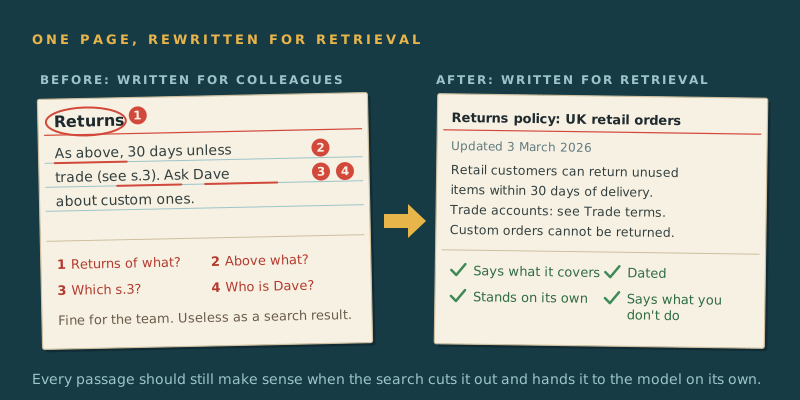
Archive outdated documents so the chatbot can't reach them, rather than relying on an instruction telling it to ignore old files. Merge duplicates into one page per topic. Give every page an owner and a review date, and put the date and scope in the text itself: "Updated March 2026. Applies to UK retail orders."
5. Fill the gaps
Write the missing answers in plain language, including what you don't do. Short is fine: a three-sentence answer the chatbot can quote beats a ten-page document it has to interpret.
6. Rewrite for retrieval
Search works best on pages that make sense on their own. When you rewrite:
- Give each topic its own page, with a heading that says what it covers.
- Name the subject in every section, so a passage still makes sense when it's cut out.
- Put key facts in text, not screenshots or scanned images.
- Keep each rule and its exceptions in the same section.
- Spell out acronyms and drop phrases such as "see above".
- Use descriptive file names. The Deakin researchers found that adding the file name to each retrieved passage helped the model use it, so "Returns policy, UK retail, 2026" beats "final_v3_FINAL.docx".
7. Check who can see what
Before connecting an internal assistant to shared drives, review sharing on sites, folders and files, starting with HR, finance and board material. Look for anything shared with everyone or with anyone who has the link. Fix permissions at the source, so they're fixed for the chatbot and for everyone else.
What Ready to Build Looks Like
Perfect documents aren't the goal. You're ready to build when:
- Each of your top questions maps to one current document.
- Every document in scope has a named owner and a review date.
- Outdated and duplicate files are out of the chatbot's reach, not just labelled.
- The chatbot has somewhere to send questions it can't answer: a person, not a guess.
- For internal tools, permissions on sensitive material have been reviewed.
Then build, and test the chatbot against the same question list. Our guide to testing AI before customers see it shows how to turn that list into a golden test set and score the answers.
Keeping the Knowledge Base Clean After Launch
A knowledge base starts going out of date the day you launch. Three habits keep it current.
- Treat unanswered questions as a to-do list. Every "I don't know", hand-off to a person and thumbs-down points to a page that is missing or unclear. Review them weekly for the first month.
- Change the source, not the prompt. When a policy changes, update the document. Patching the chatbot's instructions creates a second version of the truth that nobody else can see.
- Check that deletions reach the bot. Most chatbots search their own copy of your documents, called an index. Make sure archiving a file removes it from the index too, or your old price list lives on inside the bot.
Conclusion
Choosing a model takes an afternoon. Making sure your business has one clear, current, written answer to each question customers ask takes weeks, and it decides whether anyone trusts the chatbot. The work pays off twice, because the same pages also serve your staff and your website visitors.
If you're planning a chatbot, start the question list this week. When you're ready to build, talk to AI Native Agency. Our AI automation and agent systems team can run the knowledge base audit with you, then build the chatbot on top of it.
Frequently Asked Questions
- What is a chatbot knowledge base?
- A chatbot knowledge base is the set of documents an AI chatbot searches to answer questions, such as help articles, policies, product information and FAQs. Most modern chatbots don't memorise this content; they search it each time a question arrives and write an answer from the passages they find. That is why the quality of these documents largely decides the quality of the answers.
- Why does my AI chatbot give wrong answers?
- Usually because it found the wrong passage, found two that disagree, or found nothing and answered anyway. Outdated documents, duplicate versions of the same policy and questions nobody has answered in writing cause most of these failures. Model errors happen too, but check which documents the chatbot retrieved before blaming the model.
- How do I prepare documents for an AI chatbot?
- Start with the questions customers actually ask, then make sure each one has a single, current document that answers it. Remove outdated files, merge duplicates, fill gaps and rewrite pages so each covers one topic and makes sense on its own. Text-based formats such as web pages, Word documents and text PDFs work better than scans or screenshots.
- Can I just tell the chatbot to ignore old documents?
- It's unreliable. An instruction in the prompt depends on the model recognising which document is old, which is exactly what it struggles to do. Archive outdated files so the chatbot never sees them, and put dates in the text of current ones.
- Is it safe to connect a chatbot to SharePoint or Google Drive?
- It can be, but an internal assistant usually shows each person whatever their existing permissions allow. If files have been shared too widely, the chatbot makes them easy to find. Review sharing on sensitive sites and folders, especially HR and finance, before you connect it.
- How often should a chatbot knowledge base be updated?
- Whenever the underlying policy, price or product changes, plus a scheduled review of each page every three to six months. Review unanswered questions and poor ratings weekly for the first month after launch, then monthly.